

beasty-visual-novel / authoring / choices-and-decisions.md
Choices and decisions
Two nodes branch the story, and they are not interchangeable.
- A Choice Node asks the player. It shows a menu and waits.
- A Decision Node asks the world. It shows nothing and routes instantly.
If the player should feel responsible for what happens next, use a choice. If the story should simply go the right way because of what has already happened, use a decision. Getting this wrong is the single most common authoring mistake, and it looks like a menu with one option in it.
The Choice node
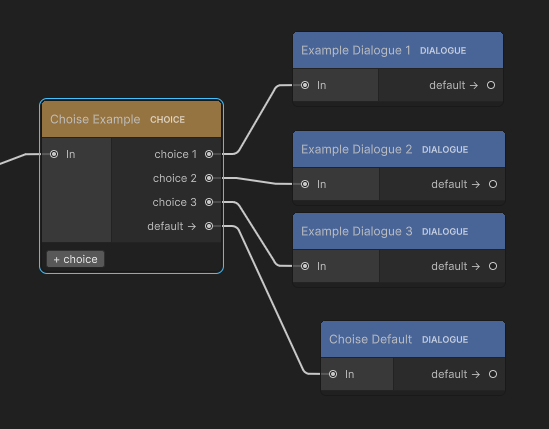
Add options with the + choice button on the node, then fill them in on the right. Each option has four
parts.
The label
A short name for the option. It appears on the node’s port in the graph and in the inspector list. It is for you — the player never sees it. Name your ports and the graph stays readable at a glance.
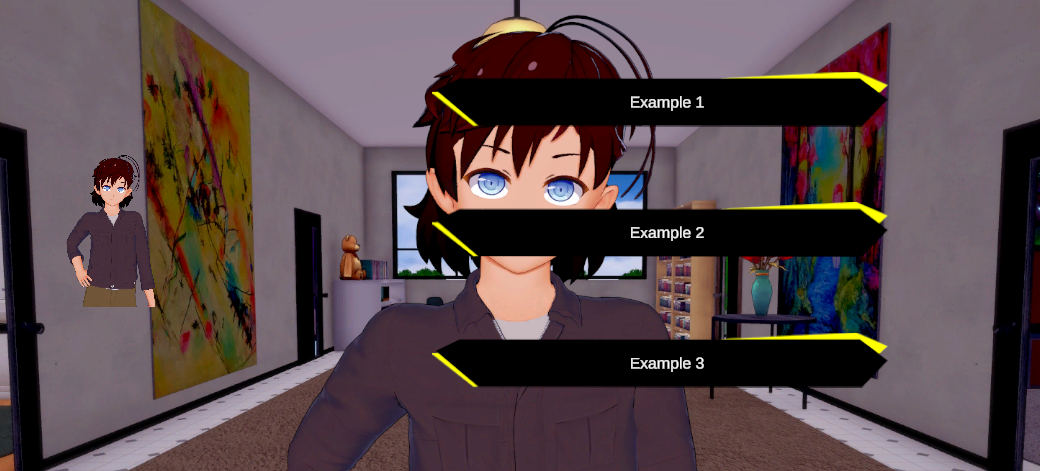
The prompt text
What the player actually reads on the button. It is a normal localizable line, like any dialogue.
The condition
Optional. Empty means the option is always offered.
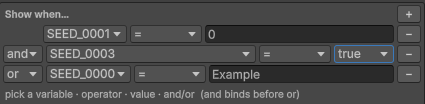
When you give an option a condition, the option is only shown if the condition passes. This is how you gate:
"Buy the sword"      if gold >= 10
"Ask about her sister"   if maya.trust > 40
"Use the key"        if item.rusty_key >= 1
An option whose condition fails is simply not in the menu. The player never sees it and cannot tell it was there.
The effects
Variable changes applied when the player picks this option — before the story moves on. Buying the sword
subtracts 10 gold, agreeing to help sets promised_to_help to true, an insult drops affection by 2.
Effects are a list of variable, operation, value rows, with the same four operations as the Set variable
block: Assign, Add, Subtract, Toggle.
The target
Where picking it leads. Two kinds:
- A node in this project. Drag the option’s port to the node. Normal branching.
- A flow exit. The option leaves the visual novel entirely:
Go to FreeRoam,Return to previous room,Choose room, orGo to another VN. An option with a flow exit has no wire — the port label shows where it goes instead. See Transitions.
That means “Leave the tavern” and “Stay and ask another question” can sit side by side in the same menu, one walking out into the world and one continuing the scene.
When every option is gated out
If every option’s condition fails, the menu would be empty. Instead of showing nothing, the choice node
continues at its default → port.
This is not an edge case, it is a design tool: a hub node with five conditional topics, whose default →
leads to “You have nothing left to ask her”, empties itself out as the player exhausts it. But it does mean
that an unwired default → on a fully-gated choice node is a dead end. Wire it.
The character sprite
A choice node can show a character image beside the options — the person you are answering. Set the character sprite on the node and the choice screen’s character panel appears; leave it empty and the panel stays hidden.
The sprite can also be conditional, with the same model as a room background: an ordered list of cases, each with a condition, and the first one that passes wins. If none pass, the default sprite is used. So the face you are answering can be angry or pleased depending on what you did earlier, without duplicating the choice node.
The Decision node
A decision node has no UI at all. The player does not see it, does not click it, and cannot tell it exists. It is a signpost the story reads by itself.
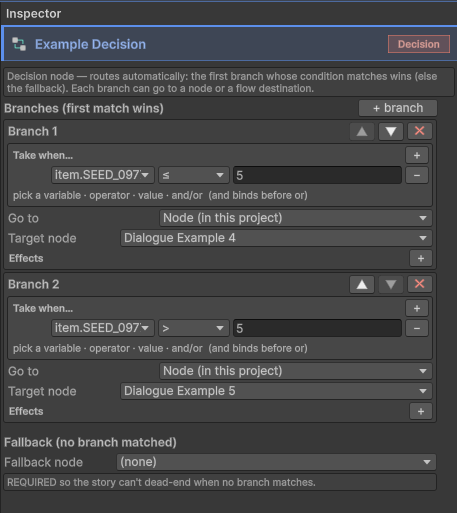
When the story arrives, the node walks its branches from top to bottom, takes the first branch whose
condition passes, applies that branch’s effects, and jumps. If no branch matches, it takes the
fallback → port.
Add branches with the + branch button. A branch has a condition, effects, and a target — a node, or a flow
exit, exactly like a choice option.
branch 1   if chapter_2_unlocked           -> Chapter 2 opening
branch 2   if maya.trust >= 50             -> The warm version of the scene
branch 3   if maya.trust <= -20            -> The cold version
fallback                                    -> The neutral version
Order matters. The first match wins, so put the most specific branch first. A branch with no condition is
labelled (always) in the graph, because an empty condition always passes — everything below it is
unreachable. That is a legitimate way to write an inline default, but do it deliberately and put it last.
When to use a decision instead of a choice
- Gating a chapter on the world state. The scene opens differently depending on whether the player has already met the sister. There is no question to ask; the story just knows.
- Splitting on a variable. Three endings by affection band. The player made those decisions long ago, one line at a time.
- Cleaning up after a choice. A choice node sets a flag, three scenes converge, and a decision node much later reads the flag and splits again. The consequence lands far from the cause, which is where consequences are supposed to land.
- Any router. A single entry point that sends the player to whichever quest is currently active.
Always wire fallback →. It is the branch that runs the day one of your conditions is wrong.
Conditions
Conditions are authored the same way everywhere in Beasty VN — on a choice option, on a decision branch, on a room background, on a talk-menu entry. A condition is a list of clauses.
A clause is token, operator, value:
- The token is a key in the variable store. That includes your own variables, character variables, time,
quests and inventory, because they all live in one store. The picker shows them with friendly labels
(
time.daypart,maya.location,maya.trust). - The operator is one of seven:
| Operator | Shown as | Means |
|---|---|---|
| Equals | = | equal |
| NotEquals | != | not equal |
| Greater | > | greater than |
| Less | < | less than |
| GreaterOrEqual | >= | greater than or equal |
| LessOrEqual | <= | less than or equal |
| Contains | contains | the value appears inside the token’s text |
- The value is what to compare against.
Joining clauses
Clauses join with And or Or, and AND binds tighter than OR:
a AND b OR c is (a AND b) OR cRead it as “either both a and b, or else c”. If you want the other grouping, split the condition across two branches — a decision node with two branches is clearer than a clever one-liner, and it survives being read six months later.
The two rules that catch people out
Warning An empty condition is always true. A choice option with no condition is always offered. A decision branch with no condition always matches, so everything under it is dead. This is intentional — it is what makes “no condition” mean “no gate” — but it means a branch you meant to fill in and forgot will swallow the story.
Warning A clause with no token is incomplete and evaluates to false. If you add a clause, pick an operator and type a value but never pick the variable, the clause is not “ignored” — it fails, and the whole condition fails with it. The option silently never appears. The engine reports it once, so check the console when an option that should be there is not.
Effects
An effect is a variable change: variable, operation, value. The operations are Assign, Add,
Subtract and Toggle (which flips a Bool and ignores the value).
Effects live in three places: on a choice option (applied when the player picks it), on a decision branch (applied when the branch is taken), and on a Return node (applied when a subgraph hands control back). They write to the same store as the Set variable block, so they persist in saves and they rewind correctly.
Use them for the small consequence that belongs to the choice itself — the gold spent, the flag raised, the trust lost. Use a Set variable block in the node you land on for anything the reader of your graph should see without opening the option.
See also
- Variables and conditions — the full treatment: scopes, value types, every reserved key.
- The story graph — the nodes and their ports.
- Transitions — flow exits as the target of a choice or a branch.
- Blocks reference — the Set variable block.