

beasty-visual-novel / production / vn-settings.md
VN settings
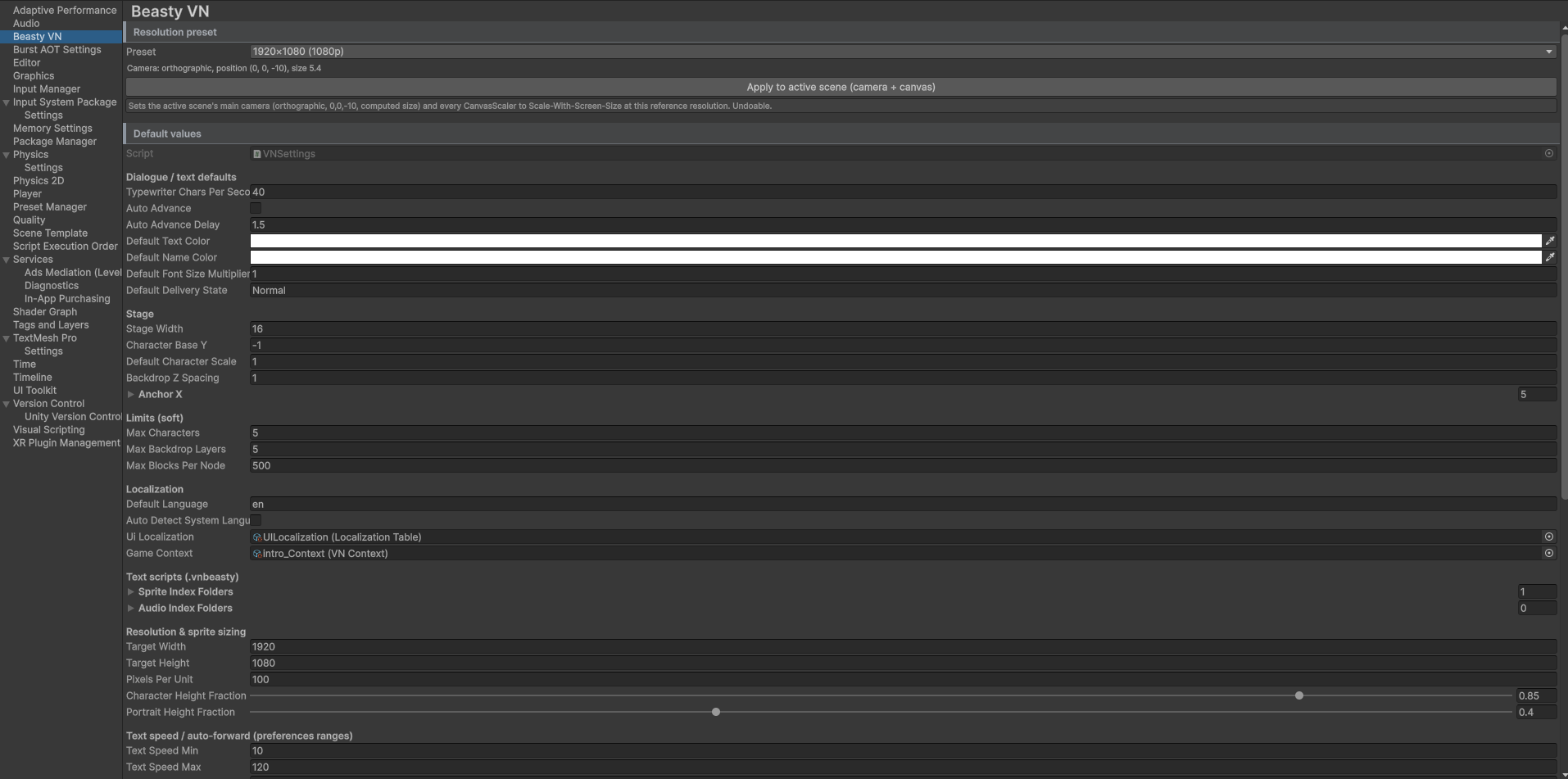
The project-wide defaults for the whole game: one asset, edited from two places, read at runtime.
Open it with Edit > Project Settings > Beasty VN, or with Tools > Beasty VN > Settings > Global Settings.
Both edit the same asset (VNSettings, which lives in a Resources folder so the game can read it in a
build).
Every setting below has a working default. You can ship without touching this page.
Shared context
| Setting | What it does |
|---|---|
gameContext | The single shared VNContext for the whole game: the cast, the variables, the character schema, the dictionary, the story localization table, the screens, the items, the quest catalog, the music config. Because the settings asset lives in Resources, this is what makes the context resolvable at runtime even from a scene that does not reference it directly. |
Change it when you have more than one context asset in the project and need to say which one is the game’s. Most projects have exactly one and never touch this.
Localization
| Setting | What it does |
|---|---|
defaultLanguage | The language code the game starts in when the player has not chosen one (en by default). Also the source language for new projects. |
autoDetectSystemLanguage | Off by default. When on, a first-run player gets the operating system’s language IF the UI table has it; otherwise the default. |
uiLocalization | The GLOBAL interface translation table: menus, HUD, buttons, dialogs. Separate from the story table on the context. |
See Localization for the startup order and the two tables.
Saving
| Setting | What it does |
|---|---|
autosaveEnabled | Whether the game autosaves at decisions. On by default. |
autosaveAntiRollbackMargin | Seconds. An autosave at the SAME position as the most recent one, within this margin, is skipped — so rolling back and re-picking the same option cannot flood the autosave ring. 2 seconds by default. |
maxAutosaves | How many autosave slots the ring holds. When it is full, the oldest is overwritten. 6 by default. |
saveSlotsPerPage | How many manual slots one page of the save screen shows. 6 by default. |
saveManualPages | How many manual pages are shown initially. The number of pages grows automatically past this, without limit. |
allowSaveNaming | Whether the player may title a save. When off, a slot is labelled with its local creation timestamp. |
defaultSaveThumbnail | The fallback image shown for a SAVED slot whose thumbnail PNG is missing or unreadable. Empty slots use the stock art on the slot prefab instead, not this. |
These are the policy settings, and they are mirrored in the BeastyManager Inspector’s Saving section, so you can edit them there without opening Global Settings. The storage configuration — backend, save location, encryption, thumbnail size — lives in that same Saving section (it belongs to the scene’s controller, not to this asset). See Saving and loading.
Rollback
| Setting | What it does |
|---|---|
maxRollbackSteps | The maximum number of rollback steps kept in memory and persisted in the save. 20 by default. Raise it for a longer Back reach; it costs memory and save size. |
Text scripts (.vnbeasty)
| Setting | What it does |
|---|---|
spriteIndexFolders | Project-relative folders indexed for sprite NAME lookup in a .vnbeasty script. |
audioIndexFolders | The same, for audio clips. |
Leave them empty and the system resolves the project’s Sprites / Audio folder, asking you if it cannot find
one.
Note These folders keep names short and unambiguous — they are not a gate. An asset outside them still resolves by name project-wide. What the folders buy you is a small, clean namespace to type into.
See The text script.
Dialogue and text defaults

| Setting | What it does |
|---|---|
typewriterCharsPerSecond | Typewriter speed, in characters per second. |
autoAdvance | Whether auto-advance starts on. |
autoAdvanceDelay | Seconds to wait on a line before auto-advancing. |
defaultTextColor, defaultNameColor | The colours used when a character does not override them. |
defaultFontSizeMultiplier | Scales the dialogue font. |
defaultDeliveryState | The delivery state used by a line that leaves it empty (Normal). |
Text speed and auto-forward ranges
These bound the sliders the player sees in the preferences screen.
| Setting | What it does |
|---|---|
textSpeedMin, textSpeedMax | The characters-per-second range the text-speed slider exposes. At the maximum, text is instant. |
autoForwardMin, autoForwardMax | The seconds range the auto-forward slider exposes. At the maximum, the story does NOT auto-advance. |
skipUnreadByDefault | The default for “allow skipping unread text”. Read text can always be fast-forwarded. |
Stage

| Setting | What it does |
|---|---|
stageWidth | The world-space width characters are spread across. |
characterBaseY | The Y characters stand at. |
defaultCharacterScale | The scale of a character that does not set its own. |
backdropZSpacing | The world-space Z gap between backdrop layers, which gives depth without sorting layers. |
anchorX | Normalized X (0 = left, 1 = right) for the five named anchors: Left, CenterLeft, Center, CenterRight, Right. |
Resolution and sprite sizing
| Setting | What it does |
|---|---|
targetWidth, targetHeight | The design resolution (1920x1080 by default). The aspect-ratio enforcer reads it. |
pixelsPerUnit | The pixels-per-unit used across the VN art. |
characterHeightFraction | The fraction of screen height a stage character should occupy. |
portraitHeightFraction | The fraction of screen height used as the (square) portrait size. |
See Building and platforms for the aspect-ratio enforcer.
Free-roam button feedback
| Setting | What it does |
|---|---|
freeRoamHoverZoom | The scale multiplier applied to a button sprite on hover. |
freeRoamHighlightColor | The tint used to highlight an interactable. |
freeRoamHoverTween | The seconds the hover zoom/highlight takes. |
Soft limits
| Setting | What it does |
|---|---|
maxCharacters | Characters on stage at once. |
maxBackdropLayers | Sprite layers in one backdrop. |
maxBlocksPerNode | Blocks in one node. Exceeding it is reported by the validator. |
See also
- Localization, Saving and loading, Building and platforms.
- Core concepts — what the context is and why there is one.