beasty-visual-novel / reference / menu-items.md
Menu items
Every menu item Beasty Visual Novel adds to Unity, grouped by submenu, with the page that explains it.
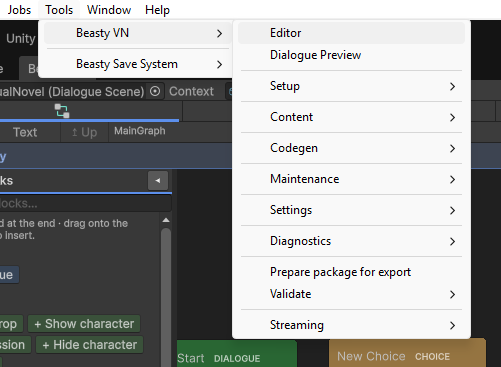
Everything lives under Tools > Beasty VN, except the asset right-click actions (under Assets >) and the
components (under Add Component > Beasty).
Windows
| Menu item | What it does | More |
|---|
Tools > Beasty VN > Editor | Opens the main Beasty VN window: the nine authoring tabs. | Editor tour |
Tools > Beasty VN > Dialogue Preview | Plays a node - backdrop, characters, props, dialogue box - without entering Play Mode. Can fast-forward to a given block. | Dialogue preview |
Setup
| Menu item | What it does | More |
|---|
Tools > Beasty VN > Setup > Create Scene | The wizard. Builds the BeastyManager, the Stage, the Canvas, the Main Camera and the EventSystem, instantiates the UI, then auto-wires. Safe to re-run: it reuses what is already there. | Your first scene |
Tools > Beasty VN > Setup > Migrate Scene to BeastyManager | Upgrades an older scene to the BeastyManager rig. | Your first scene |
Tools > Beasty VN > Setup > Blank Canvas | Asks for a folder, then creates the empty scaffolding: a DialogueScene, a VNContext, a LocalizationTable, a root StoryGraph and a first Dialogue node, in subfolders. | Assets |
Tools > Beasty VN > Setup > Build Default Menu Prefabs | Regenerates the menu prefabs from scratch. Warns before overwriting. | UI prefabs |
Tools > Beasty VN > Setup > Upgrade UI Prefabs (keep customizations) | Updates the shipped UI prefabs while keeping your restyling. | UI prefabs |
Tools > Beasty VN > Setup > Bake Localized UI Labels | Permanently adds VNLocalizedText, with its key, to every label in the open scene whose text matches a UI-table value - writing into the source prefabs. | Localization |
Content
| Menu item | What it does | More |
|---|
Tools > Beasty VN > Content > Create Base Assets (intro + FreeRoam map) | Creates only what is missing and wires it up. It never duplicates the context and never overwrites a reference you already assigned. | Core concepts |
Tools > Beasty VN > Content > Character Database | Opens the Characters tab in its own window. | Characters |
Tools > Beasty VN > Content > Generate Tight Click Shapes (Selection) | Builds click areas that follow the selected sprite’s opaque pixels instead of its bounding box. | Interactables and doors |
Codegen
| Menu item | What it does | More |
|---|
Tools > Beasty VN > Codegen > Regenerate VNVars Accessors | Regenerates VNVars: typed C# accessors for your variables. | Generated accessors |
Tools > Beasty VN > Codegen > Regenerate VNChars Accessors | Regenerates VNChars: typed C# accessors for your characters. | Generated accessors |
Neither is needed to author a game. They exist so a programmer gets compile-time-checked keys.
Maintenance
| Menu item | What it does | More |
|---|
Tools > Beasty VN > Maintenance > Validate Selected Project | Runs the validator over the root graph and every subgraph, and reports dangling references. | Validation and ids |
Tools > Beasty VN > Maintenance > Clean Deleted-Asset Residue | Removes references left behind by assets you deleted. | Validation and ids |
Validate
| Menu item | What it does | More |
|---|
Tools > Beasty VN > Validate > Find duplicate ids | Reports id collisions across assets. Two assets that share an id behave as one. | Validation and ids |
Settings
| Menu item | What it does | More |
|---|
Tools > Beasty VN > Settings > Global Settings | Opens VN Settings. The same asset as Edit > Project Settings > Beasty VN. | VN Settings |
Streaming
| Menu item | What it does | More |
|---|
Tools > Beasty VN > Streaming > Convert To Streamed Content | Marks the art Addressable and clears the direct references. Requires the Addressables package. | Streaming |
Tools > Beasty VN > Streaming > Convert To Direct References | The reverse. Always available, with or without Addressables. | Streaming |
Warning
Addressables streaming is opt-in and currently in beta. It works, but the API may change in a minor release.
Export
| Menu item | What it does | More |
|---|
Tools > Beasty VN > Prepare package for export | Publishing helper: prepares the package for a .unitypackage export. | Building and platforms |
Assets right-click
Select an asset in the Project window and right-click.
| Menu item | What it does | More |
|---|
Assets > Beasty VN > Give this asset fresh ids (fix a duplicate) | Re-ids the selected asset. This is how you fix a duplicate that Find duplicate ids reported. | Validation and ids |
Assets > Beasty VN > Ensure Room Background Child | Adds the room component and a background child to a hand-made room prefab, so you can drop the room art in and place interactables against it. | Free roam rooms |
Add Component
| Component | What it is | More |
|---|
Beasty > Beasty Manager | The single GameObject the whole game hangs off. It owns every manager as a hidden sub-component. | Controllers |
Beasty > Beasty Loading Screen | The loading overlay shown while the scene boots and between modes. | UI prefabs |
Beasty > Beasty Aspect Ratio Enforcer | Keeps the game at a fixed aspect ratio, letterboxing the rest. | UI prefabs |
Beasty > VN Transition Curtain | The fade used when the game changes mode. | UI prefabs |
The wizard adds the BeastyManager for you. You only need Add Component when you are building a scene by
hand.
The BeastyManager inspector has an Auto-wire / Repair button. It guarantees every manager exists and
re-resolves the scene’s views by type, and it only fills empty references - it never overwrites your
wiring. If a scene stops working after you moved objects around or edited a prefab, press it first. See
Troubleshooting.
See also

