

Visual Novel › World
Phone screens
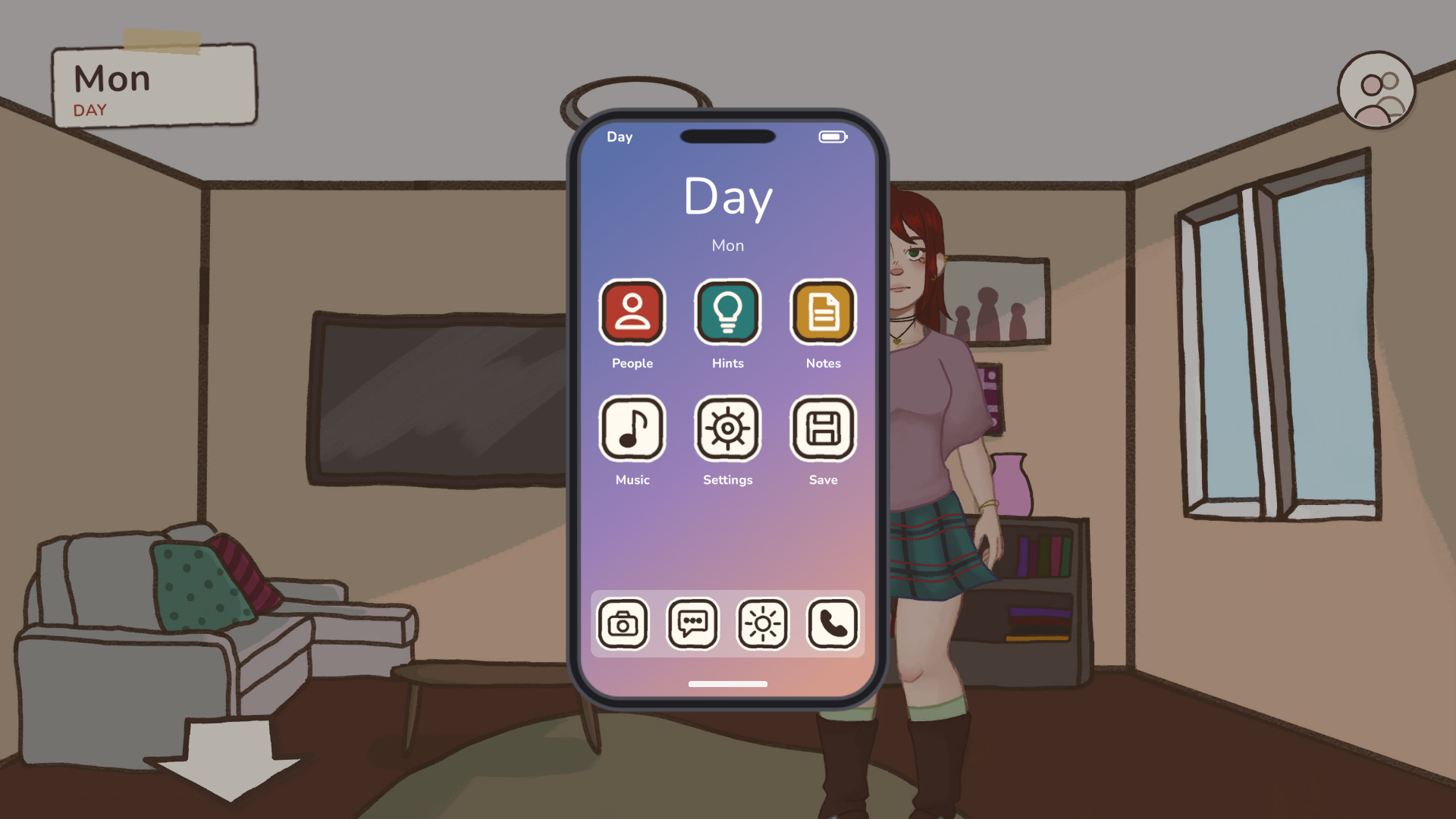
The phone is a ready-made smartphone overlay: a clock, a grid of apps, a home bar. Each app is an ordinary screen item, so you change, add and remove apps in the Screens section like anything else. Phone versions of the menu, inventory and character screens open inside the same phone body.
Creating the phone
In the Screens section, pick + New screen ▸ Phone. Beasty:
- copies
Prefabs/Phone.prefabinto your Screens folder; - registers it as a secondary screen in both modes, placed under
VN_Canvas; - if you have a primary HUD screen, adds a Phone button to it that opens the phone.
What is on the phone
- A status bar with the time and a battery icon.
- A big clock and date, from
@time:clock.labeland@time:weekday.label. - A scrolling app grid that wraps to the phone’s width, a dock, and a home bar that works as Back.
The apps it comes with:
| App | What it does |
|---|---|
| People | Opens the phone character list. If the project has none, it is created, with its profile. |
| Hints | Turns walkthrough hints on and off. Hidden when the project has walkthrough off; its icon is crossed out while hints are off. |
| Music | Mutes and unmutes the music. Its icon is crossed out while muted. |
| Settings | Opens the game menu on Preferences. The phone stays underneath. |
| Save | Opens the game menu on Save/Load. The phone stays underneath. |
| Notes, Camera, Messages, Weather, Calls | Decorations, ready for you to give them a job. |
App labels come in every language the built-in UI texts have for them (Settings, Save, Music…). The others come in English and Spanish (People, Hints, Notes). Translate them in Localization › Game UI, like any screen text.
+ Button inside the phone adds an app that looks like the others: a copy of the grid’s ItemTemplate.
Phone apps
The + New screen menu has phone versions of the screen templates:
| Entry | What it creates |
|---|---|
| Secondary ▸ Phone app | An empty app. |
| Menu ▸ Phone grid / Phone list | A menu of buttons inside the phone. |
| Inventory ▸ Phone | The inventory inside the phone. |
| Characters ▸ Phone | The People list and the character profile. |
Each phone app shows the phone body with a status bar, a title with a back arrow, and a home bar; both the
arrow and the home bar go back. It is registered as a secondary screen in both modes and placed under
VN_Canvas.
- The People screens are titled “People” (Spanish “Personas”).
- The inventory is titled “Inventory”, filled in every language of the game text table from the built-in UI texts. Change it in the Game UI tab like any other screen text.
- Menus and the empty app take the screen’s name when they are created. Renaming the screen later does not change the title; edit the Title item instead.
- In the phone inventory, a long item description ends in ”…”, so the item’s name and the Cancel / Use buttons stay on the phone screen.
An app opens exactly over your phone
A new app copies your phone’s body: its size and position (also for a phone you moved by hand), the screen inset, the bezel and wallpaper sprite, color and slicing, and the backdrop color. It copies the first phone in Screens, or the package one when there is none. Changing the phone later does not update apps that already exist.
Creating a phone app is one Ctrl+Z step. Undo leaves the copied prefab files in your Screens folder.
For scripters
The PhoneAppScreen component marks a screen prefab as the phone version of a template.
See also
- Screens and HUD — items, actions and the secondary stack.
- Character screens — the character list and profile.
- Items and inventory — the inventory screen.
- Localization — translating app labels.
- House Demo — the HUD’s phone with People, Hints, Music, Settings and Save.