

beasty-visual-novel / world / talk-menu.md
The talk menu
The per-character conversation hub: the “what can I say to this person right now” menu. Click a character in a room and this is what opens. This page is for writers and designers.
If you have played a Ren’Py dating sim, you know the shape: you walk up to someone and get a short list of things you could bring up — the errand she asked for, the rumour you just heard, “how was your day”, “goodbye”. The list is different every time, because the world moved.
The key idea
A quest’s talk steps are inserted into the menu automatically, before your manual entries.
You never maintain the menu. You do not write “if the apple quest is active and the player is holding five apples, show a Deliver option”. You give the objective a talk step pointing at Ana, and the entry appears in Ana’s menu exactly when it should — and disappears the moment it is done.
What that means in practice:
- The menu always lists exactly what this character can talk about right now.
- Adding a quest to a character adds a line to their menu. Removing it removes the line.
- A character with ten quests across the game still has one small menu at any moment, because only the current step of each active quest is offered.
The manual entries below are for what the character can always talk about: the small talk, the shop, the goodbye.
Where you author it
Tools > Beasty VN > Editor, tab Characters, sub-tab Talk Menu. Pick a character at the top.
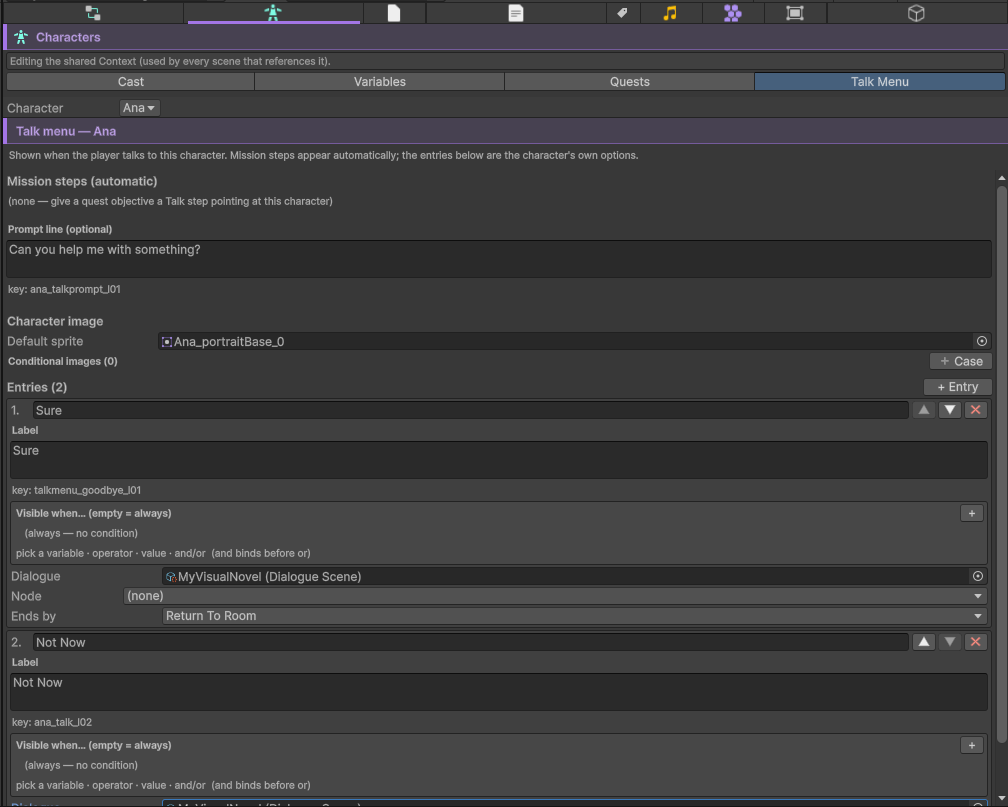
The tab shows you two things:
- Mission steps (automatic) — a read-only preview of the quest steps that will appear in this character’s menu. If it is empty, no quest objective has a talk step pointing here.
- The character’s own entries — the list you maintain. Create talk menu seeds a first entry (a “Goodbye” that returns to the room); + Entry adds more.
The whole menu can be deleted too (Delete talk menu…, with confirmation and undo), returning the character to its pre-talk-menu state. Its localized texts stay in the table.
The prompt
The Prompt line (optional) is what the character says while the menu is open — “What do you need?”. Leave it empty and no dialogue box is shown at all: just the options.
You can also give the menu a character image (a pose shown beside the options), with an ordered list of conditional images: the first case whose condition passes wins, otherwise the default. A different pose per daypart, per room, per mood.
An entry
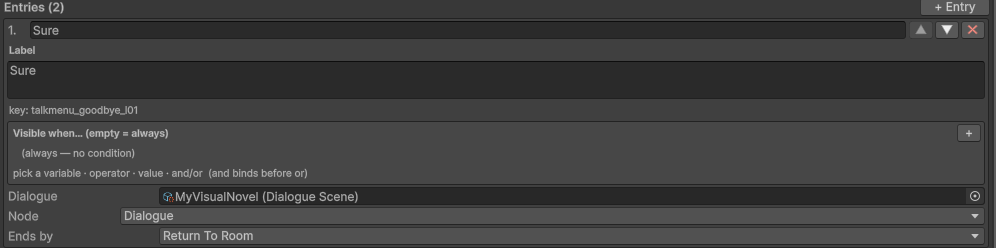
| Field | What it is |
|---|---|
| Label | The line the player clicks. Localized, from the same table as your choice texts. |
| Visible when | The condition. Empty = always visible. The full catalog is available: rooms, dayparts, quests, items, character variables. |
| Dialogue | The scene that runs when the entry is picked. Empty = no dialogue: the ending applies immediately. |
| Node | Which node of that scene to start at. |
| Ends by | What happens when the branch finishes. See below. |
How an entry ends
Ends by is what happens when the picked branch runs out — when no explicit flow block inside it says otherwise. A flow block inside the branch always wins.
| Ending | What happens |
|---|---|
ReturnToRoom | Back to the room the player was standing in. The normal choice. |
BackToMenu | Back to the talk menu, re-evaluated. Use it for “anything else?” branches. |
GoToRoom | Straight to another room. |
None | Nothing. The branch decides for itself. |
GoToRoom also takes a Clock setting for the arrival:
- leave it empty and time advances one daypart — the classic dating-sim “you spend the afternoon together”;
- set it to keep the clock, and time does not move;
- name a daypart to jump straight to it.
BackToMenu is worth understanding: the menu is re-resolved when you return to it, so an entry that just
became false is gone, and one that just became true is there. Hand over the apples, come back to the menu, and
the delivery entry has vanished.
Handing items over from a conversation
A GatherDeliver objective (Quests) is completed by giving the items to the quest’s owner, and the talk menu is where that happens.
An entry for it appears in the character’s menu automatically, but only once the player is actually holding the items. Until then there is nothing to pick — which is exactly the behaviour you want, and none of it is authored.
When the player picks it, the objective’s Delivery timing decides when the basket changes hands:
| Timing | What happens |
|---|---|
OnPick | The items are consumed the instant the entry is picked. The dialogue that follows already sees the objective as done — so it can open with “these are perfect”. |
OnBranchEnd | The dialogue plays first; the hand-over settles when the branch ends. |
DialogueBlock | No automatism at all. You put a Deliver items block inside the dialogue, at the exact line where she reaches for the basket. |
The Deliver items block (palette category Quests) names a quest and an objective. It verifies the inventory, consumes the items, and marks the objective done.
Warning Deliver items does nothing, silently, if the player does not have the items. It is not an error and it does not stop the scene. That is safe by design, but it means a mis-wired block fails quietly. Reach the block from a branch the talk menu only offers when the items are held, or gate it with a condition of your own.
In the text script the block is one line:
deliver ana_apples deliver_applesA deliver entry with no dialogue wired still works: picking it hands the items over and returns to the re-evaluated menu, so the player sees the entry disappear.
How the player reaches the menu
Two ways, and you will use both.

From a room — the usual one. Any object in a room whose owner character is set, with the function Talk menu, opens that character’s menu. And you get it for free anyway: clicking a character standing in a room opens her talk menu, as long as she has entries and her routine’s on-interact scenes do not claim the click first. See Interactables and doors and Character routines.
From the story — a Talk Menu node in a story graph. Right-click the canvas, Create > Talk Menu Node,
and say whose menu to show. It also takes a default next node: where the flow continues when the menu
resolves to no visible entries at all. That is the dead-end guard — set it.
In the text script the same node is a talkmenu header with the character id in parentheses, and the
default next node is its default -> line:
talkmenu charla (ana):
    default -> after_talk
See the .vnbeasty syntax.
The order of the list
- The automatic quest steps, in catalog order. For an Ordered quest, only the current objective is offered; for a Free quest, every unfinished one.
- Your manual entries, in the order you wrote them, filtered by their conditions.
A quest step only appears if its quest is active, its objective is not done, and — for a delivery — the player holds the items. A plain (non-delivery) step also needs its dialogue node wired; a step with no dialogue is not a menu entry.
A pattern worth copying
A character’s manual list rarely needs to be long. Three entries carry most of a game:
| Label | Visible when | Dialogue | Ends by |
|---|---|---|---|
Talk | (empty) | a small talk scene, usually a subgraph with variations | BackToMenu |
Spend the afternoon together | maya.affection >= 3 and time.daypart == Afternoon | a date scene | GoToRoom (the park) |
Goodbye | (empty) | (empty) | ReturnToRoom |
Everything else — every errand, every delivery, every “come find me at the docks” — arrives on its own, from the quests.
See also
- Quests — talk steps, GatherDeliver objectives, delivery timing.
- Interactables and doors — the Talk menu action and character poses.
- Character routines — where the character is standing when the player wants to talk.
- Characters — the cast, and each character’s definition.
- Localization — the table the labels and the prompt come from.