

Visual Novel › World
Wardrobe and outfits
A wardrobe is the set of clothes a character can wear on top of their layered expressions: tops, hats, glasses, earrings. The story puts pieces on and takes them off, or switches a whole outfit at once, and what the character wears is saved with the game like any other variable.
Each character has their own wardrobe. Open it with Characters › Cast › Wardrobe…, which opens the Expression Composer on its Wardrobe tab.
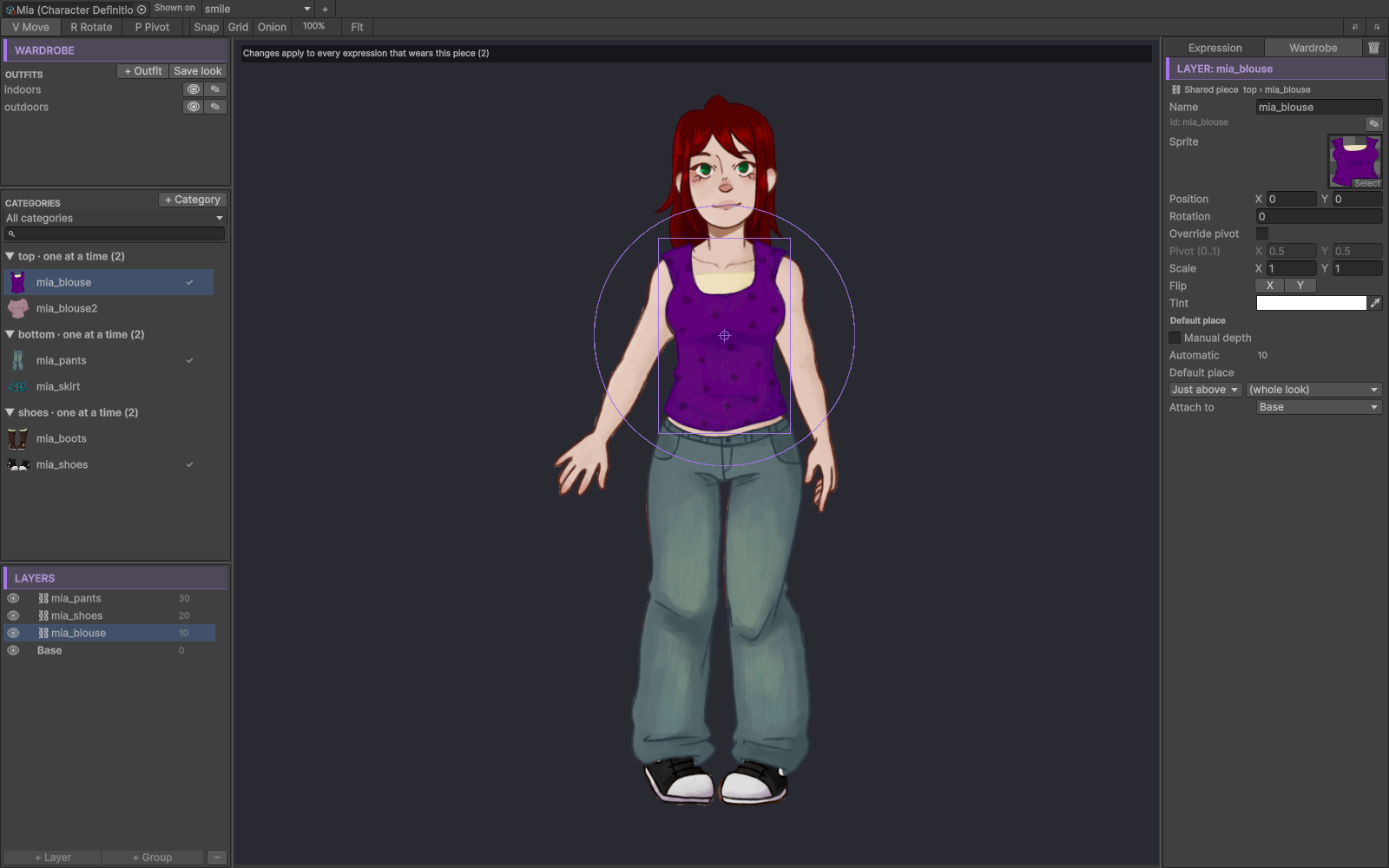
Categories and pieces
A wardrobe is made of categories — top, hat, glasses, any name you choose. Add one with
+ Category. Each category holds pieces: the actual clothes.
A category works in one of two modes:
| Mode | How it behaves | Its settings |
|---|---|---|
| One at a time | Putting a piece on takes the previous one off. A top, a pair of shoes. | Can be empty — whether the category may be left bare. Default piece — what shows while the story says nothing. |
| Several at once | Each piece goes on and off by itself. Earrings, a scarf, a badge. | Worn by default, ticked on each piece that starts worn. |
A piece can have several parts — a jacket with a front and a sleeve, say — each with its own place in the draw order.
Moving a piece to another category is its Category drop-down, and only to a category with the same mode. The blocks, conditions and scripts that name the piece follow it. The outfit entries and Always wear settings that used it in its old category are removed; the confirmation says how many, and warns when the two categories have different default positions.
Default position
A category can have an optional Default position. Its pieces then appear there, measured from what each piece attaches to, and a piece’s own position becomes a nudge from it. Switching it on asks whether to move the pieces there or leave them where they are drawn now. The cross button places the position on the canvas.
Editing pieces
On the Wardrobe tab, you edit the pieces themselves on a reference expression, under “Changes apply to every expression that wears this piece (N)”.
To fix a piece for one expression only, go to the Expression tab and drag the worn piece there. The inspector says “Adjusted in this expression only” and offers Reset adjustment.
Clothes are ordered per expression in the layer tree, like layers. Drag them, group them (Ctrl+G), use Bring forward / Send backward or Manual depth — a whole category or a single piece part. Dropped into a group, they move with it (Moves with in the inspector). Use default place undoes it. A part’s Default place is where it draws in the expressions where it was not moved.
Outfits
An outfit is a named set of choices: school, party, pajamas. It changes only the categories it
names; the rest stay as they are.
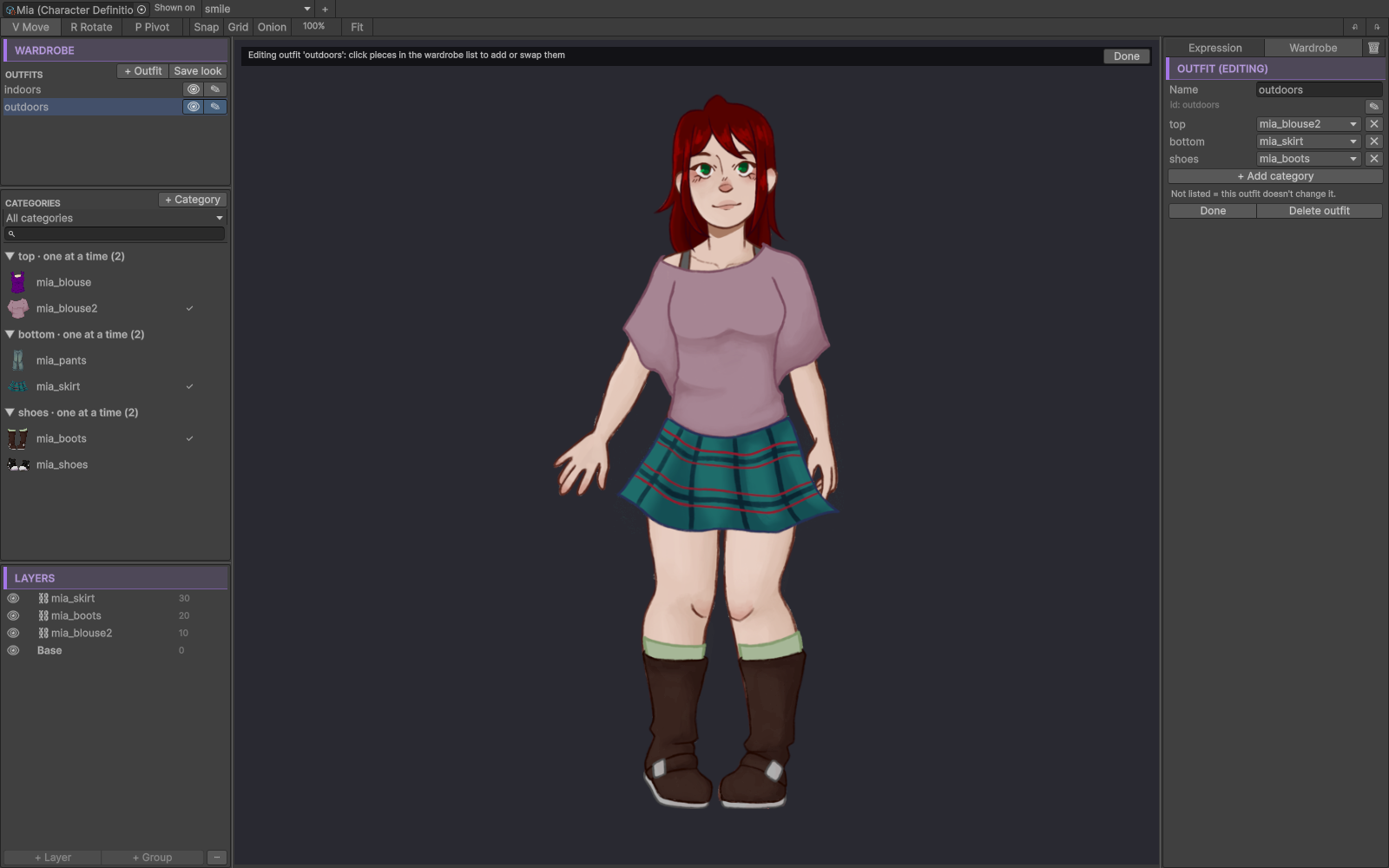
- + Outfit creates an empty one. + Add category inside the outfit adds a category to it; the × button removes one.
- In a Several at once category, an outfit fixes exactly which pieces are worn.
- The eye button previews the outfit on the canvas without saving it. The canvas banner reads
“Previewing:
” ; Esc stops. - The pencil button edits the outfit by dressing the character: click a piece in the wardrobe list to
add or swap it. The banner reads “Editing outfit '
'” , and Done finishes. - Save look saves what the canvas shows as a new outfit, and asks which categories to include.
An outfit entry naming a piece that no longer exists shows as (missing:
What a character wears
When the game draws a character, each category takes the first answer from this list:
- the expression’s Always wear pieces;
- what the story put on;
- the expression’s Default outfit, set on the expression card;
- the category’s default.
The Default outfit keeps a character from appearing undressed in an expression before the story has dressed them. To make a piece always show in one expression, drag it onto the canvas and pick Always wear this in this expression from its context menu.
Changing clothes from the story
Three blocks change clothes, all in the Scene category of the palette:
| Block | What it does |
|---|---|
| Wear piece | Pick the Category first; then Put on or Take off and the piece. In a Several at once category the piece is required. |
| Change outfit | Puts an outfit on. Its editor shows a thumbnail of the character in that outfit and a summary of what it changes. |
| Show character with an Outfit | Shows the character and puts the outfit on, in the same line. |
When a character has no categories yet (Wear piece) or no outfits yet (Change outfit), the block editor shows an Open wardrobe… button.
The change shows on its own line. When that line has a transition,
the change happens inside it: a with dissolve before the line fades the new clothes in. Changes made from
code, from free roam, or by loading a save refresh the characters already on stage.
In a .vnbeasty script:
wear mia top hoodie
wear mia earrings hoops off
wear mia hat none
outfit mia party
show mia happy outfit party
none takes off a One at a time category; autocomplete offers it only for a category that may be left
empty.
A category that cannot be empty keeps its piece
Emptying a One at a time category whose Can be empty is off is ignored with a warning, and the scene
keeps showing that piece — on that line too. This covers a Wear piece that takes off, wear <char> <category> none, and an outfit entry with no piece. The messages are:
- “Category '
' of ' ' cannot be left empty; it keeps its piece.” - “Outfit '
' of ' ' empties a category that cannot be left empty; it keeps its piece.”
An outfit applies every entry it can. Its warning names the first entry it could not apply.
Conditions on clothes
What a character wears is a character variable, so conditions can read it. The condition picker offers:
- one value per One at a time category:
@char:mia:@wear.top; - a yes/no per piece of a Several at once category:
@char:mia:@wear.earrings.hoops.
These conditions answer what the character really wears. While the story has not changed a category,
@wear.<category> reads its default piece, and @wear.<category>.<piece> whether the piece is worn by
default. An expression’s Default outfit does not count here: it is how one expression draws, and a
condition does not look at expressions.
Saves, rewind and free roam
Because clothes are variables, they are saved with the game and follow rewind and the rollback between the novel, free roam and rooms. Saves made before the wardrobe existed load fine: every category starts on its default.
The Dialogue Preview inherits the clothes worn in earlier nodes, and ▶ Play effects starts from the clothes worn before the change, so the change itself plays.
A missing piece never breaks the scene. An unknown category, piece or outfit draws what exists, falls back to the default and logs a warning once.
Ids and renames
Categories, pieces and outfits get ids generated from their names, editable in the Composer (the grey id under the name, with its ✎ button). A rename re-points everything that names the id, in one undo step:
- inside the character: outfits, category defaults, adjustments and parents;
- across the project: Wear piece, Change outfit and Show character blocks, the
@char:<id>:@wear.<category>keys and the piece values compared with or assigned to them; - the linked
.vnbeastyscripts.
none is reserved for pieces. Games saved before a category or piece rename still name the old id; there,
the category shows its default piece.
What the validator checks
Tools > Beasty VN > Maintenance > Validate Selected Project reports:
- a default piece, outfit entry, Default outfit, Always wear piece or adjustment that names a category, piece or outfit that does not exist;
- a One at a time category that cannot be empty and has no default piece;
- an outfit that names one piece for a Several at once category, or lists several for a One at a time one;
- Wear piece, Change outfit and Show character blocks with unknown ids, no character, or no piece in a Several at once category;
- a Take off left without a piece after its category became Several at once, or a Take off that names a piece in a One at a time category that cannot be empty. These also show on the node’s badge.
From code
BeastyWardrobe changes and reads clothes at runtime: Wear, Remove, TakeOff, SetOutfit, GetWorn,
IsWorn and ResetToDefaults. See Gameplay APIs.
See also
- Layered expressions — the layers clothes sit on, and the Expression Composer.
- Blocks reference — Wear piece, Change outfit and Show character.
- Variables and conditions — conditions on
@wearkeys. - Variable keys — the
@wearkey format. - House Demo — Party night dresses Mia from the player’s choices.