

beasty-visual-novel / production / validation-and-ids.md
Validation and ids
Two tools that find the problems your players would otherwise find for you: the validator, which sweeps a project for references that point at nothing, and the id tools, which fix the one mistake that silently breaks a story.
The validator
Run it from the Validate button in the Beasty VN window, or select a DialogueScene in the Project window
and use Tools > Beasty VN > Maintenance > Validate Selected Project.
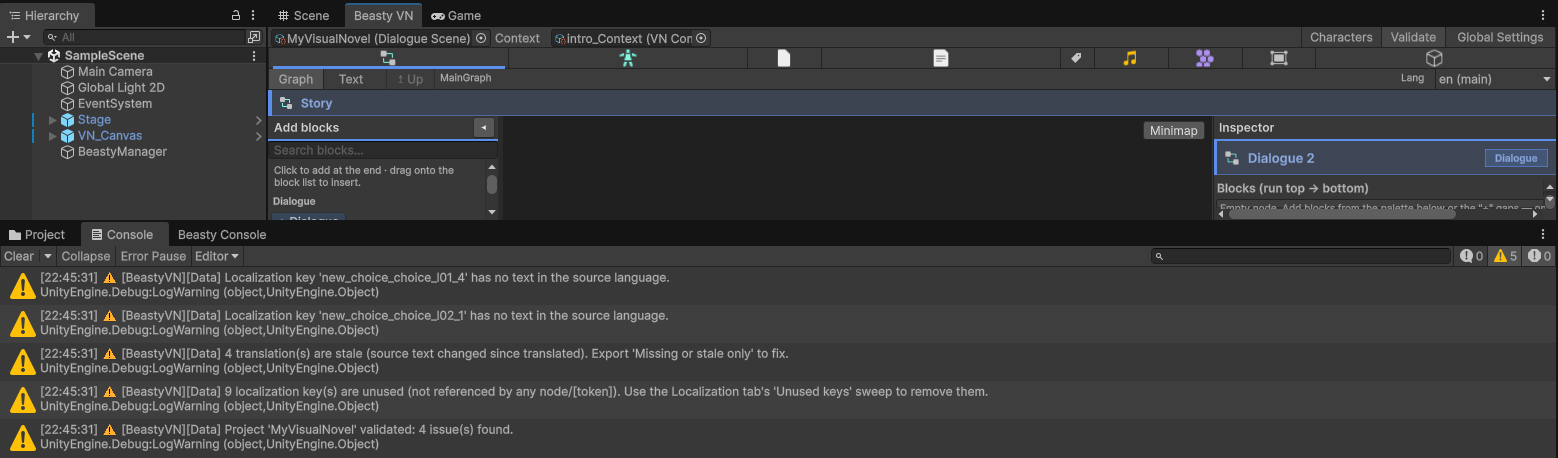
It walks the root graph and every subgraph reachable from it, and reports what it finds in the console — and, per node, as a badge on the graph canvas, so you can see which node is complaining without reading a log.
What it checks:
- Dangling references. A block that names a character id, a variable key, a dictionary token or a character field that does not exist. These are the ones that hurt: a typo in a speaker id does not throw, it silently narrates the line.
- Broken routes. A node pointing at a node id that is not in its graph. A decision node with no fallback. A choice node with no usable choice. A flow node with no action.
- Unreachable nodes — a node no route from the entry node can arrive at.
- Subgraphs. A subgraph node with no graph, a subgraph with no valid entry node, and any outcome the subgraph can RETURN that the caller neither routes nor covers with a fallback.
- Quests and talk menus. An update-quest or deliver block naming an unknown quest or objective, a deliver
block pointing at an objective that is not a gather-and-deliver, an open-screen block naming a screen that
does not exist, a talk step with a dialogue but no start node, a
SpecificDaysquest with no days selected (it would never run). - Localization. Keys with no text in the source language, the totals of missing and stale translations, and keys the table holds that nothing references any more. See Localization.
- Token collisions. A
[token]name defined in more than one source (a variable, the dictionary, the localization table, a character id), which tells you which one wins before it surprises you.
Run it before a build, and run it after a big refactor. It is fast and it never changes anything.
Ids
Every Beasty asset carries an id: story nodes, graphs, dialogue scenes, characters. Ids are what jumps, choices, routines and free-roam doors point at.
They are auto-generated, but they are yours to edit. Renaming an id cascades: the references that used it
are rewritten with it. So a machine-generated id can become chapter1_intro if that is easier to live with.
Duplicate ids
An id only auto-generates when it is EMPTY. So when you duplicate an asset in the Project window (Ctrl+D), the copy carries the original’s id — and nothing downstream can tell the two apart. A jump routes to whichever the lookup hits first. Two characters become aliases of each other.
Two tools:
Tools > Beasty VN > Validate > Find duplicate idsreports every id used by more than one asset, with the paths that use it, in the console.- Right-click the offending asset in the Project window and choose
Assets > Beasty VN > Give this asset fresh ids (fix a duplicate). It gives every id inside that asset a fresh value and rewrites the references to them WITHIN the same asset — so the copy stops impersonating the original and its own internal wiring (jumps, choice targets, decision branches, the entry node) still points where you put it.
Warning The repair cannot know about references from OTHER assets — a free-roam button that names a node id inside the scene you just re-id’d, or a
Go to VN sceneblock. It tells you how many ids it changed; re-point those by hand.
Cleaning up after a deletion
Tools > Beasty VN > Maintenance > Clean Deleted-Asset Residue removes what Unity leaves behind when you
delete a Beasty asset:
- Null slots left in the context’s character list and in a graph’s node list.
- Dangling node-id strings pointing at a node whose asset is gone. These are ids, not object references, so Unity cannot null them for you.
- Stale generated code:
VNVarsandVNCharsare rebuilt, so a variable or character you deleted stops existing in your C# too (see Generated accessors).
It is cheap, and running it twice does no more than running it once — so it is never a risk.
Auto-wire
Select the BeastyManager in your scene and press Auto-wire / Repair.
What it guarantees:
- Every manager the game needs exists, as a hidden sub-component of the BeastyManager.
- The scene’s views are resolved by type and connected.
The rule that makes it safe: auto-wire only fills EMPTY references. It never overwrites wiring you did yourself. So you can press it at any time, on any scene, without losing a deliberate connection.
It is also the first thing to try when the game boots to a black screen with no errors — see UI prefabs.
See also
- Localization — the missing/stale reports the validator surfaces.
- UI prefabs — the black-screen symptom auto-wire fixes.
- Menu items reference — every menu item in one table.
- Troubleshooting.