

beasty-visual-novel / production / saving-and-loading.md
Saving and loading
Saves work out of the box. You do not write any code, and you do not have to tell the system what to save. This page is for the designer who wants to know what a slot is, what it contains, and what the player sees when something goes wrong.
Slots
A save lives in a slot. There are two kinds:
| Kind | Slot name | Written by |
|---|---|---|
| Manual | manual_0, manual_1, … | The player, from the save screen |
| Autosave | auto_0, auto_1, … | The game, automatically (see Autosave) |
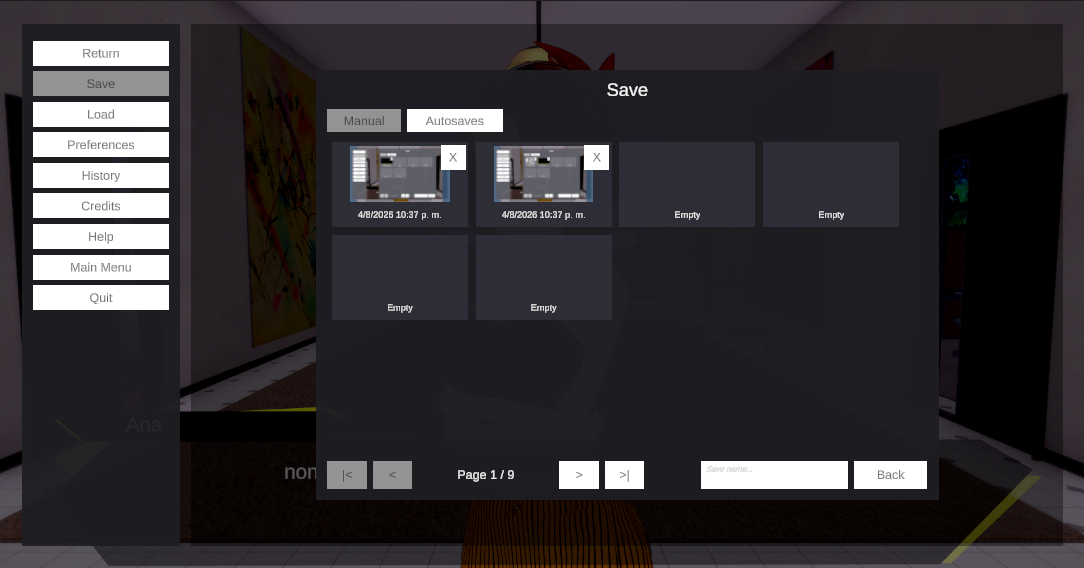
Beside each save file the game writes a PNG thumbnail with the same name, so the save screen shows a picture of the moment the player saved. If a thumbnail is missing or unreadable, the slot falls back to the default thumbnail sprite from VN Settings. (An EMPTY slot shows the stock art on the slot prefab instead, not that fallback.)
The thumbnail never shows the pause menu. The screenshot is taken the moment the menu opens, before it draws, so a manual save shows the scene the player was looking at — not the menu covering it. Autosaves capture the live scene, since no menu is open when they fire.
Each slot also carries a name. If allowSaveNaming is on, the save screen’s text field lets the player
title the save; when they leave it blank, the slot is labelled with the local date and time it was created.
The save screen shows one page of manual slots at a time — saveSlotsPerPage of them — with pager
buttons. saveManualPages sets how many pages are shown initially, and the pages auto-grow: there is
always at least one empty page past the last one the player used, so they never run out of room. Autosaves
have their own dedicated page, which is load-only — the player cannot overwrite an autosave by hand.
Autosave
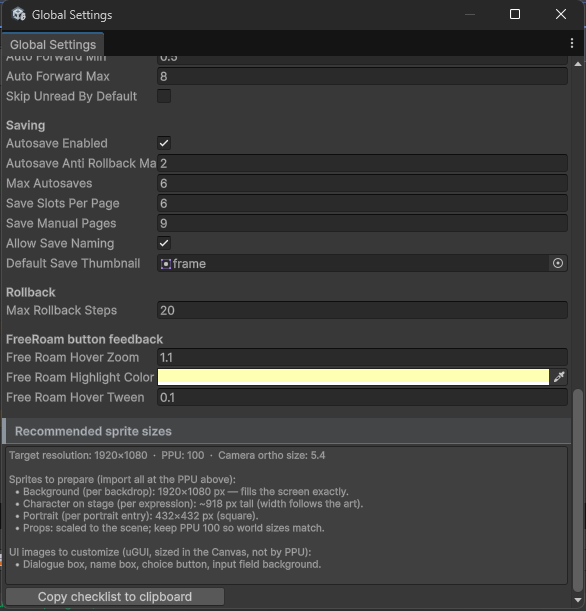
Autosave is on by default (autosaveEnabled). The game autosaves when the player reaches a decision.
The policy:
- The autosave slots form a ring of at most
maxAutosavesentries (6 by default). When the ring is full, the OLDEST autosave is the one overwritten. - The save UI never overwrites an autosave. They live under their own prefix and their page is load-only.
- Anti-rollback de-dupe. If the most recent autosave is at the same position (same node, same step) and was
written less than
autosaveAntiRollbackMarginseconds ago, the new autosave is skipped. Without this, a player who rolls back and re-picks the same option would flood the ring and push their real autosaves out.
Ordering is derived from each file’s creation timestamp, so it survives a restart with no extra bookkeeping.
What a save actually holds
All of it. This is the reassuring part, so here is the list:
- The project id, the graph path through any nested subgraphs, the current node and the step within it.
- The active language.
- The entire variable store — your variables, character variables, game time, quest state, the inventory, and the dictionary. They all live in one store, which is why they all save without being registered anywhere. See Variables and conditions.
- The visited nodes (so “seen text” and skipping stay correct).
- The open screens — the secondary overlays that were open, innermost last, so a load reopens the same navigation stack.
- The free-roam state: the scenario, the current room, and the rooms the player has visited.
- The stage: the backdrop, the characters on it and the props — restored even when the scene on screen was inherited from an earlier node.
- The rewind history and the cross-mode rollback queue, so
Backstill crosses lines and modes after a load instead of dead-ending at the restored line. - The pending talk-menu outcome, so a save taken in the middle of a talk branch still applies its ending.
- The state of every
BeastySaveablecomponent in your scene — your own GameObjects, saved with the story. - A
customStateJsonblob that is yours to fill (see below).
Sprites, prefabs and other Unity object references are never written into a save. They are re-resolved from your assets on load, so moving or restyling art does not invalidate an old save.
Loading, and a damaged save
Loading a slot restores everything in the list above and puts the player back exactly where they were, including the mode they were in — visual novel, free roam or a custom mode.
Every write is atomic — the new file is fully written or not written at all — and the previous good file
is kept beside it as a .bak backup. So when a slot cannot be read —
a half-written file after a power cut, a tampered save — the load reports that a backup is available, and the
save screen offers the player a confirmation dialog: “This save is damaged. Restore the backup copy?”.
Accepting restores the previous version of that slot and retries the load. A damaged slot stays VISIBLE in the
list, labelled Damaged save, so the player can restore or delete it rather than watching their save silently
vanish.
The Saving section: one place for all of it
Everything this page describes is configured in one place: select the BeastyManager and open its
Saving section — a boxed foldout like the manager sections, with a badge naming the active backend
(Local file, or Active · Firebase Firestore when a cloud backend is on).

Inside, the storage configuration mirrors the Save System’s grouping — Backend, Location, Security, Reliability, Versioning — plus Thumbnails (the capture size) and the Save policy from Global Settings (autosave, slots per page, naming, the default thumbnail), so the policy fields documented in VN settings are editable here too.
Four of those settings are per-project and carried straight into the save layer:
| Setting | Default | What it does |
|---|---|---|
| Data path | empty | Absolute base path for save files. Empty means the platform’s persistent data path — recommended. |
| Backup | on | Keep a rolling .bak of the previous save for each slot. |
| Strict loading | on | A save that no longer matches the story or scene fails as a whole instead of applying partially. |
| Data version | 1 | The version stamped into every save, for future migrations. |
Cloud saves
The Storage dropdown in the Saving section’s Backend group picks where saves live. Local file is the
default and is everything described above. With the Firebase SDK in the project, two more entries appear —
Firebase Firestore and Firebase Realtime Database — and picking one moves the saves to the cloud,
per player:
- The save/load screen, the autosave queue, slot listing, delete and backup restore all work against the cloud backend, asynchronously under the hood. There is nothing else to configure.
- Slot thumbnails travel inside the save and rebuild the local thumbnail cache on any device — a player who continues on a second machine sees their pictures, not blank slots. Local saves keep writing the sibling PNG exactly as before.
- Players are signed in anonymously by default; each player’s saves live under their own user id.
Without the Firebase SDK installed nothing changes — the dropdown shows only Local file. The setup, the
data layout and the security rules are documented on the Save System side:
Cloud saves with Firebase and
Storage backends.
Where the files are, and what powers this
Saves are written under the platform’s persistent data path (or the Data path you set in the Saving
section), in the VisualNovel folder, with the extension vnsave, and the thumbnail as a .png beside
each one. With a cloud backend there are no local files: saves live in the backend, per user.
This is all powered by Beasty Save System, which ships inside this package. There is nothing to install and no external dependency — no Newtonsoft, no add-ons. It is the same save system documented as a product of its own:
- Beasty Save System — what it is and what it can do.
- Backups and corruption — the atomic write, the
.bakfile, and exactly what a player sees when a save goes bad.
Saving your own game state
If you are a programmer and your game has state the story engine knows nothing about — a minigame, a battle system, a map screen — you have two ways in:
- Put a
BeastySaveableon your GameObjects. Their state is captured with the save and restored with it, with no code. See Scene state. - Use the Custom app state and its
customStateJsonblob, which saves, loads and rolls back with everything else. See Custom mode.
See also
- VN settings — autosave, slots per page, save naming, the default thumbnail.
- UI prefabs — restyling the save/load screen and the slot template.
- Input and controls — quick save (F5) and quick load (F9).