

beasty-visual-novel / world / variables-and-conditions.md
Variables and conditions
Everything your game remembers is a variable. Everything your game decides is a condition. This page is the foundation for the rest of the World section: quests, items, time, routines and screens are all built on the two ideas below, and once you understand the store you understand all of them.
Creating a variable
Open Tools > Beasty VN > Editor, go to the Variables tab and press + New Variable.
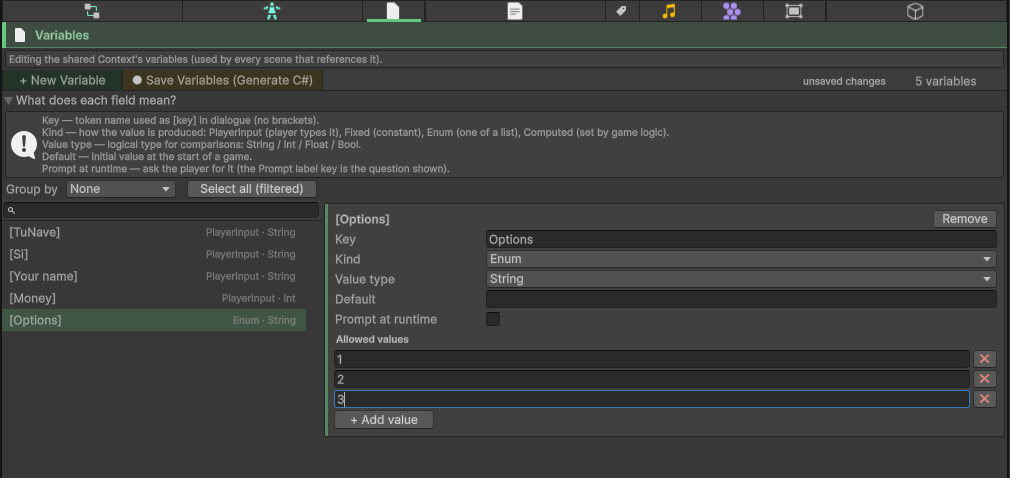
A variable has:
| Field | What it is |
|---|---|
| Key | Its name, written without brackets: gold. In dialogue you write it as [gold]. |
| Value type | String, Int, Float or Bool. |
| Kind | How the value is produced. See below. |
| Default value | The value before anything sets it. |
| Prompt at runtime | Ask the player for this value when the game starts. |
The four kinds describe where a value comes from. They are a label for you and your team, and they change what the editor offers you:
| Kind | Meaning |
|---|---|
| PlayerInput | The player names it (their hero’s title, their ship’s name). |
| Fixed | A constant you set and the game does not change. |
| Enum | One of a fixed list of allowed values you type in. An Enum variable is always stored as a String. |
| Computed | Derived by game logic — the story writes it, you never hand-set it. |
Asking the player
Two ways to let the player fill a variable:
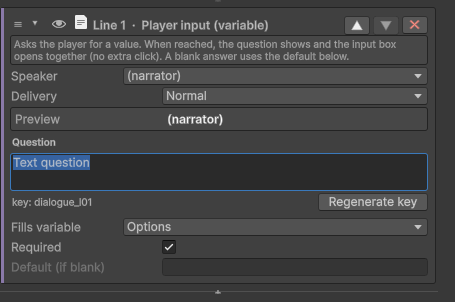
- Turn on Prompt at runtime on the variable itself, and give it a prompt label. The player is asked for it at the start.
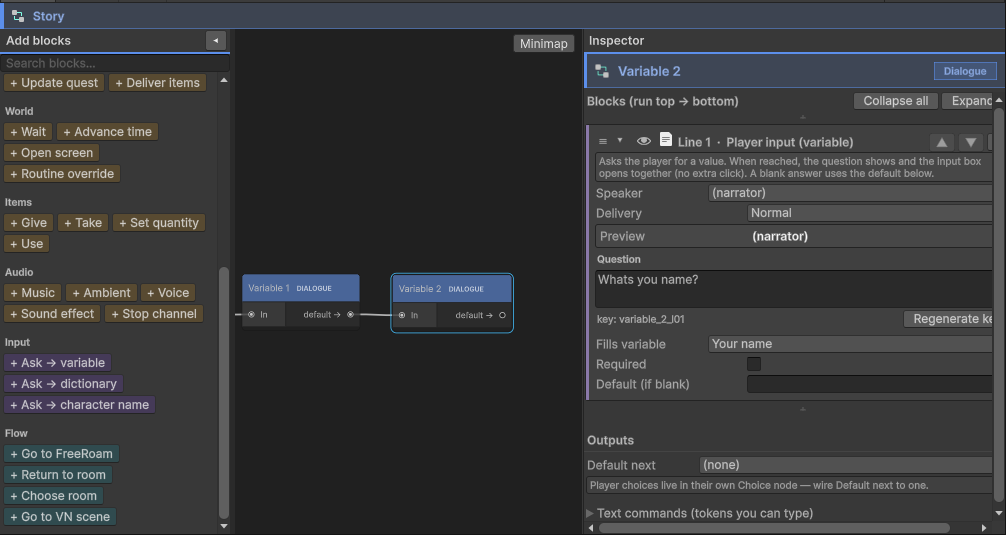
- Use the Ask -> variable block (palette category Input) anywhere in the story. It is a self-contained stop: it shows a question line — with an optional speaker, like any dialogue line — and opens the input box at the same time. It has a default used when the player leaves the box blank, and a required flag that rejects a blank answer instead.
There are two sibling blocks, Ask -> dictionary and Ask -> character name, which do the same thing for a dictionary token and for a character’s displayed name.
Changing a variable
The Set variable block (palette category State) is the whole story. Pick a variable, pick an operation, type a value:
| Operation | What it does |
|---|---|
| Assign | The variable becomes the value. |
| Add | Numeric. gold + 10. |
| Subtract | Numeric. gold - 10. |
| Toggle | Flips a Bool. The value box is ignored. |
Add and Subtract work in whole numbers when both sides are whole numbers, and in decimals as soon as
either side has a fractional part. A variable holding something that is not a number counts as 0 for
these two.
To change a value on a character — maya.affection, juan.met — use the Character variable block
instead. It is the same three fields plus the character. It exists as its own block only so the editor can
show you that character’s fields to pick from.
The same mutation is available outside a block, as an effect. See Effects below.
The store
Here is the part that makes the rest of the package make sense.
There is one flat key/value store, and everything is in it. Your variables, your character’s stats,
the game clock, where every character currently is, every quest’s state, every item the player holds, and
every dictionary token — one store, one list of keys and values. The subsystems do not each keep their own
private data. They write into the same place your gold variable lives.
| What | The key it lives under |
|---|---|
| Your variables | gold — the key, no prefix |
| Character variables | @char:<id>:<field> |
| Character routine state | @char:<id>:@routineLocation, @char:<id>:@routineSpot, @char:<id>:@routineMode |
| Game time | @time:daypart, @time:hour, @time:day, @time:weekday, @time:season |
| Quests | @quest:<id>:@state, @quest:<id>:@stage, @quest:<id>:@period, @quest:<id>:@rewarded, @quest:<id>:@penalized, @quest:<id>:@lastResult, and @quest:<id>:<objectiveId> per objective |
| Inventory | item.<id> (how many are held), inventory.order (the slot order) |
| Dictionary | the token’s own key |
Three things follow from this, and they are the reason the package is built this way:
- Any condition can read any of it. “It is Tuesday evening, Maya is in the bakery, the player has three coins and has finished chapter one” is one condition with four clauses, not four different systems talking to each other. You never write glue code to ask the time system a question.
- All of it is saved, and you do nothing. A save writes the store. Add a quest, add an item, advance the clock — it is already in every save file, with no extra work and nothing to remember.
- Rewind works on all of it. The player rolling back three lines rolls back the gold they spent, the quest they started and the hour that passed, because all three are the same kind of thing.
You will not normally type these keys by hand. The condition picker and the block pickers show them, and
they show them with friendly labels: time.daypart, time.hour, maya.location, maya.spot,
maya.routineMode, maya.affection. The full list is in
Variable keys.
Note The reserved namespaces all start with
@or contain a., which a variable key you type cannot produce. Yourgoldcan never collide with the engine’s.
Conditions
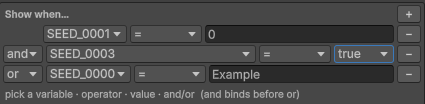
A condition is a list of clauses. A clause is three things: a token (any key in the store), an operator, and a value.
Where you can attach one
| Attached to | What it decides |
|---|---|
| A choice option | Whether the player is offered it |
| A decision branch | Whether the story takes that route |
| A talk menu entry | Whether the player can say that |
| A room’s conditional background | Which background the room shows |
| A room object’s Shown when | Whether the object is on screen |
| A door’s access exception | Whether the door is open, and which line plays when it is not |
| A door’s conditional VN action | Which scene the door leads into |
| A routine rule | Where a character is at this moment |
| A quest’s Start when / Fail when, and an objective’s Complete when | Whether the quest starts, fails, or that objective is done |
| An item’s Use condition | Whether the player may use it here |
| A screen, and a screen item | Whether the HUD button or overlay is shown, and which icon and label it uses |
| A character’s cast-list visibility | Whether the player sees them in the cast list |
Everywhere, the same editor and the same evaluator. Learn it once.
Operators
| Operator | Meaning |
|---|---|
Equals | The value matches |
NotEquals | The value does not match |
Greater | Numeric > |
Less | Numeric < |
GreaterOrEqual | Numeric >= |
LessOrEqual | Numeric <= |
Contains | The text contains the value |
And, Or, and precedence
Each clause after the first carries a join: And or Or.
AND binds tighter than OR. A condition written as
a AND b OR cmeans (a AND b) OR c, not a AND (b OR c). AND-before-OR is the standard grouping, and it is the
single most common source of a condition that “does not work”. If you want the other grouping, reorder the
clauses or split the logic across two branches of a decision node.
The two rules that catch everyone out
Warning An empty condition is always true. No clauses means “no condition” means “yes”. A choice with an empty condition is always offered; a door with an empty access exception is always open. This is what you want almost all of the time — it is why you can leave the condition field alone and everything shows — but it means you cannot gate something by leaving the condition blank.
Warning A clause with no token is incomplete, and evaluates to false. If you add a clause and forget to pick a variable, the whole thing fails closed: the choice never appears, the door never opens. It fails closed on purpose — a half-written condition that passed would silently unlock all the content behind it. The engine reports it once in the Console, naming the clause, so you can find it.
Effects
An effect is the same change a Set variable block makes, applied at a moment when a block cannot run. It is the same three fields — a key, an operation (Assign / Add / Subtract / Toggle), a value — and it behaves identically.
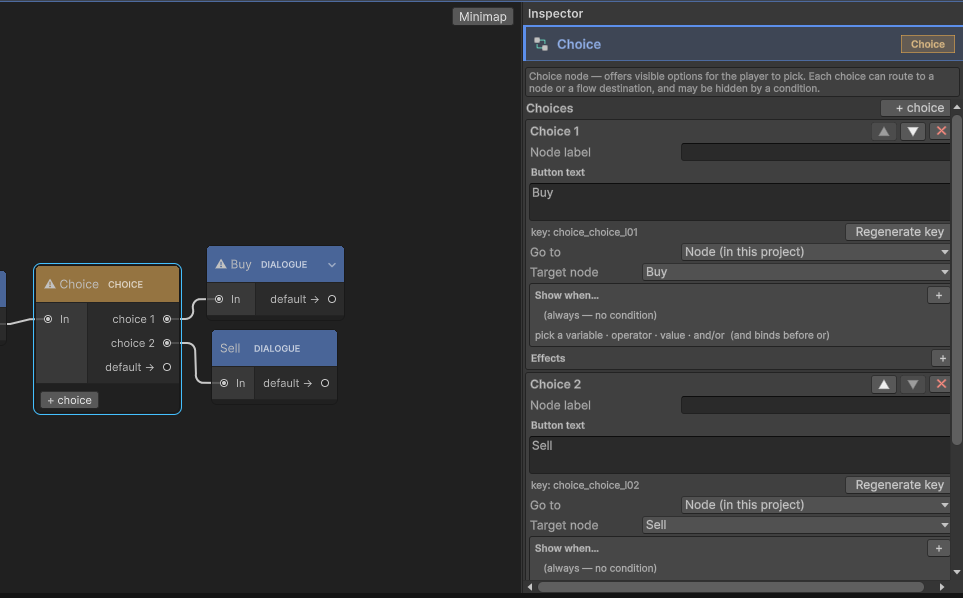
Effects are attached to:
- A choice option. Applied when the player picks it.
- A decision branch. Applied when the branch is taken.
- A Return node. Applied when a subgraph returns its outcome.
- A quest. Its reward effects on completion, its penalty effects on failure.
- An item. Its use effects, applied when the item is used.
- A screen item. Its click effects, applied when the player clicks that HUD button.
So “picking this choice costs 10 gold and makes Maya like you less” is two effects on the choice, and no blocks at all. See Choices and decisions.
Shared conditions and @self
@self is a placeholder that stands for “whichever character this is being evaluated for”. It is used
where one condition is applied to the whole cast in turn — the shared visibility condition of the cast
list is the main one. Write the condition once against @self, and each character is tested against
their own field:
@self.met == trueThat one line reveals each character in the cast list as soon as their own met flag is set. Without
@self you would write the same condition once per character. See
Character screens.
For programmers
You can read and write every one of these keys from C#, and you do not have to type the key strings.
Tools > Beasty VN > Codegen generates VNVars and VNChars: typed, compile-time-checked accessors for
the variables and characters that exist in your project. See
Generated accessors, and
Gameplay APIs for the time, routine, quest and inventory facades.
See also
- Core concepts — project, context, graph, node, block
- Variable keys — every reserved key namespace
- Characters — character variables and the schema
- The dictionary — player-editable text tokens
- Choices and decisions — where conditions and effects do most of their work
- Blocks reference — every block, by category