

beasty-visual-novel / authoring / transitions.md
Transitions: leaving the novel
A visual novel in Beasty is not the whole game. It is one of the modes the game can be in — the others are free roam, where the player walks around rooms and clicks things, and whatever you build yourself. A transition is the moment the story hands control over.
There are four transitions. They exist twice: as blocks you put inside a dialogue node, and as a dedicated Flow (Mode Switch) Node. They do exactly the same thing. Which one you use is a question of how the graph reads.
The four exits
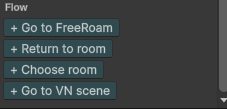
Go to FreeRoam
Leaves the novel and puts the player in a room.
- Map — the free-roam map to enter.
- Room — where to arrive. Leave it empty and the player arrives at the map’s entry room.
Use it for the end of a chapter that opens the world up: the intro finishes, and now you can walk.
Return to room
Goes back to the free-roam room the player was in just before this novel started.
You pick nothing. “Where you came from” is implicit, which is exactly the point: the same conversation node can be reached from the kitchen, the garden and the shop, and this exit puts the player back where they were each time. If the player did not come from free roam at all, they arrive at the map’s entry room instead.
This is the exit almost every ordinary conversation ends with.
Choose room
Leaves the novel and lets the player pick which room to go to. A room selector opens; on picking, they arrive there.
- Map — the map whose rooms are offered.
- Allowed rooms — an optional whitelist. Leave it empty and every room in the map is offered.
Use it for a fast-travel beat: “Where do you want to go tonight?”
Go to VN scene
Jumps straight to another Visual Novel — from the Intro to Chapter 1, say — without passing through free roam.
- Project — the Visual Novel to switch to.
- Start node — optional. Leave it empty to start at that project’s entry node.
This swaps the whole story asset. It is not a subgraph: a subgraph stays inside the current project and comes back with an outcome (Subgraphs); this one does not come back.
The variable store survives the jump
All four exits keep the shared variable store. Everything in it — your variables, character variables, the game time, quests, the inventory, the dictionary — is exactly as it was on the other side.
That is what makes multi-scene games work. A flag you set in the intro is readable in Chapter 4. Gold spent in a conversation is gone when the player reaches the shop, three rooms and two days later. You do not carry anything across by hand, and there is nothing to wire.
Exit block or Flow node?
A trailing exit block
Add the exit as the last block of a dialogue node. It runs when the player advances past the last line — not while the line is on screen. The player reads the goodbye, clicks, and the room fades in.
Use it when the exit is the natural end of the thing the node is already doing:
Dialogue         Maya: "I will see you tomorrow."
Dialogue         Maya: "Do not be late."
Return to room
That is one box in the graph, and it says what it is: a short goodbye that puts you back where you were. A separate node for the exit would add a wire and a box and tell the reader nothing new.
Note The exit runs after the node’s other blocks, on advance past the end. It does not fire the instant the last line appears, which is why the player gets to read it.
A dedicated Flow node
Create a Flow (Mode Switch) Node and give it one exit. It has no output port — there is no “after” inside this graph.
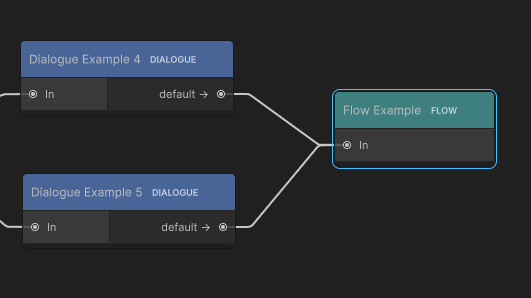
Use it when the transition is a structural fact of the story, and you want it visible as its own box:
- A chapter boundary. Everything in Chapter 1 funnels into one
Go to VN scenenode. When you rewire the chapter order, you rewire one box. - A junction. Five different endings of a scene all lead to the same “back to the world” node. One node, five wires in, instead of the same trailing block copy-pasted five times.
- Anything you want to be able to point at during a review and say “that is where the game stops being a novel”.
The rule of thumb: if the exit belongs to a specific line, make it a block. If it belongs to the shape of the story, make it a node.
Exits as the target of a choice or a decision
A choice option and a decision branch can both target a flow exit instead of a node. Set the option’s target to a flow destination and it hands control out of the novel when it is picked, rather than jumping to another node.
The targets offered are:
Node (in this project)Go to FreeRoamReturn to previous roomChoose roomGo to another VN
An option or branch with a flow target has no wire in the graph — there is nothing in this graph to point at. Instead, its port label shows where it goes, so the node still tells you what happens.
This is how you write the menu that mixes staying and leaving:
"Ask her about the letter"   ->  a node in this scene
"Ask her about her sister"   ->  a node in this scene
"Leave"                      ->  Return to previous room
The player sees three options. Two continue the conversation; one ends it and puts them back in the kitchen.
See also
- Free roam rooms — the maps and rooms these exits lead to.
- Blocks reference — the Flow category.
- The story graph — the Flow (Mode Switch) Node.
- Choices and decisions — options and branches.
- Core concepts — the app modes and the shared variable store.