

beasty-visual-novel / production / streaming.md
Streaming (Addressables)
Load art on demand instead of loading the whole game into memory. Streaming is opt-in, and it is currently in beta — it works, and the tests cover it, but the API may change in a minor release. If that is not a risk you want on a shipping project, leave it off: everything below is off by default and costs you nothing.
Why you would want it
A long game has a lot of art. Without streaming, every backdrop, every expression of every character and every item icon is a direct reference from an asset the game loads at startup, so it all comes into memory whether the player ever reaches that chapter or not. On a phone, or on a game with hundreds of backdrops, that is the difference between shipping and not shipping.
Streaming replaces those direct references with addresses, and loads a sprite when the scene that needs it is about to show, releasing it when the scope that asked for it closes.
The model, and why it is safe
Every streamable art field is a pair: a direct reference, and an address.
The direct reference always wins, and it resolves synchronously. That is the default, and it is exactly the behaviour of a project that has never heard of Addressables. Nothing is deferred, nothing is asynchronous, nothing can pop in a frame late.
Resolution only goes asynchronous when all three of these are true:
- The direct reference is empty, AND
- an address is set on that field, AND
- a provider is registered — which happens automatically when the Addressables package is installed.
If any one of them is false, you get the direct reference, synchronously. This is why turning streaming on is not a leap of faith: a field you did not migrate keeps behaving exactly as before, next to one you did.
The streaming module itself only compiles when com.unity.addressables is in the project. Without the package,
the module does not exist and there is nothing to go wrong.
Turning it on
- Install the Addressables package (
com.unity.addressables) from the Package Manager. - Run
Tools > Beasty VN > Streaming > Convert To Streamed Content.
The converter walks every migratable art field in the project — character expressions, portraits and free-roam sprites, item icons, quest map markers, room backgrounds and their conditional cases, and the backdrop and prop layers inside your dialogue nodes — marks each sprite Addressable, and clears the direct reference.
The sprites are placed in three groups:
| Group | What goes in it |
|---|---|
VN_Characters | Expressions, portraits, free-roam character sprites. |
VN_Rooms | Room backgrounds, backdrop and prop layers, quest map markers. |
VN_Items | Item icons. |
Addresses are the asset’s GUID with the sprite name in brackets, so moving or renaming the file does not break the reference.
It is not a one-way door
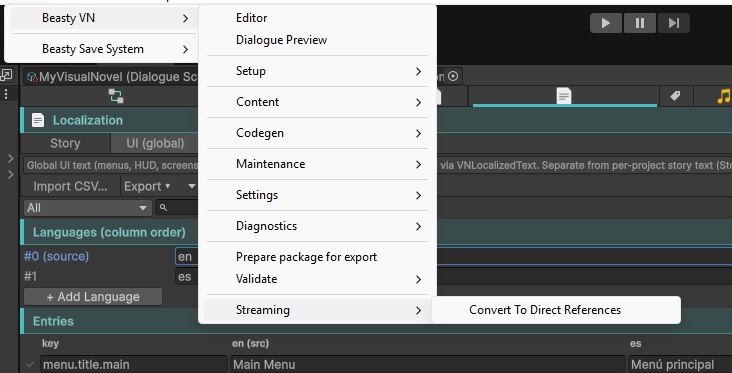
Tools > Beasty VN > Streaming > Convert To Direct References does the reverse: it resolves every address back
to its sprite and restores the direct reference. That command is always available, even if you uninstall the
Addressables package, precisely so a project can always get its direct references back.
What is NOT streamed
Only sprites in the fields listed above are migrated. These stay direct references, and keep working exactly as they always did:
- Audio clips.
- Video clips.
- Fonts.
- Free-roam object art and hover art.
- Choice images and talk-menu images.
- HUD and screen icons.
- Save thumbnails.
Node streaming
Separately from art, nodes are loaded through a sliding window: the current node, the previous one (so Back
still works), and the nodes the current one can reach — a prefetch list per node, kept on the node itself.
Nodes that fall outside that window are released. With everything in memory this is bookkeeping; with a
streaming provider behind it, it is real memory management.
The gotcha you must know
Warning Every time you build the game, rebuild the Addressables content too. Streamed art resolves through the Addressables catalog, and a stale catalog does not know about the sprites you just migrated or changed — so the art will not resolve at runtime. Make “Build Addressables content” a step in your build checklist, right next to running the validator. See Building and platforms.
See also
- Large projects — when streaming is worth turning on, and what else to do first.
- Building and platforms — the pre-build checklist.