

beasty-visual-novel / world / quests.md
Quests
The quest catalog: what the player is supposed to be doing, how you check that they did it, and what they get for it. This page is for writers and designers.
You author quests in the Beasty VN window (Tools > Beasty VN > Editor), tab Characters, sub-tab
Quests. The list on the left is filtered by Owner and grouped by type or recurrence; the editor on the
right is the selected quest. + Quest adds one. The catalog itself is a QuestCatalog asset, created and
wired into your shared context the first time you open the tab.
A quest
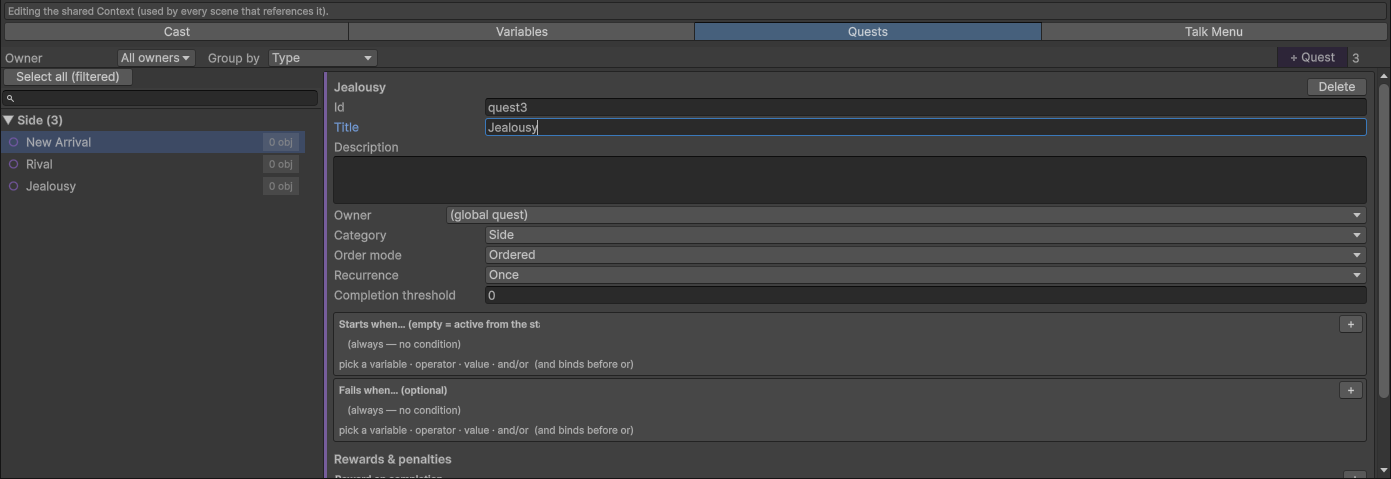
| Field | What it is |
|---|---|
| Id | The stable id. Blocks and conditions name the quest by it. Editable; renaming re-points everything that referred to it. |
| Title | What the player sees in the quest log. |
| Description | The longer text. |
| Owner | The character this quest belongs to. Leave it empty for a global, main-story quest. |
| Category | Main or Side. |
| Order mode | Ordered or Free. See Stages. |
| Recurrence | Once, Daily, Weekly or SpecificDays. See Recurring quests. |
| Completion threshold | How many required objectives count as done. 0 = all of them. |
| Starts when | The condition that activates the quest. Empty = active from the start. |
| Fails when | Optional. While the quest is active, if this passes the quest fails. |
| Reward on completion | Variable effects applied once, when the quest completes. |
| Penalty on failure | Variable effects applied once, when the quest fails. |
| Objectives | The steps. See below. |
The owner is what makes a quest show up in that character’s profile. A quest with an owner is “Maya’s delivery”; a quest with no owner is “the main story”.
States
A quest is always in exactly one of four states, and the state is an ordinary variable
(@quest:<id>:@state), so you can read it in any condition:
| State | Meaning |
|---|---|
notstarted | Waiting for Starts when. |
active | In progress. |
completed | Done. The reward has been paid. |
failed | Lost. The penalty has been paid. |
You do not have to drive the state by hand. Starts when activates it; the objectives complete it. But you
can drive it from a scene when the story calls for it, with the Update quest block (palette category
Quests): set the state, set the stage, advance the stage, or mark an objective done. Reaching completed
or failed that way still pays the reward or the penalty, exactly once.
There is no “start quest” button to remember: a manual start is authored as a condition. Set a variable in the scene where the player accepts the job, and make that variable the quest’s Starts when.
Rewards and penalties
Both are lists of variable effects: gold += 50, maya.affection += 1, item.bread = 3. Item grants are
effects on the item’s count. Each is latched — it fires once and only once, no matter how many times
the quest is recomputed.
Stages, and what “ordered” means
In an Ordered quest the objectives unlock top to bottom. The current objective is the one at the stage
index — the first objective that is not yet done. The stage is published as @quest:<id>:@stage, so a
condition can ask “is the player on step 2 yet”.
Ordered gating only waits on required objectives. An optional objective the player skipped does not lock the rest of the quest forever.
In a Free quest there is no stage: every objective is open from the moment the quest activates, and the player can do them in any order.
You can move the stage yourself with the Update quest block — Set stage to jump to a step, Advance stage to add to it. That is how a conversation pushes a quest forward without the player having to trip a condition:
[Dialogue]      Maya: "Good. Now take this to the miller."
[Update quest]  quest = bread_run, action = AdvanceStage, stage = 1
In the text script:
quest bread_run stage += 1
quest bread_run state = completed
quest bread_run objective run = true
Objectives
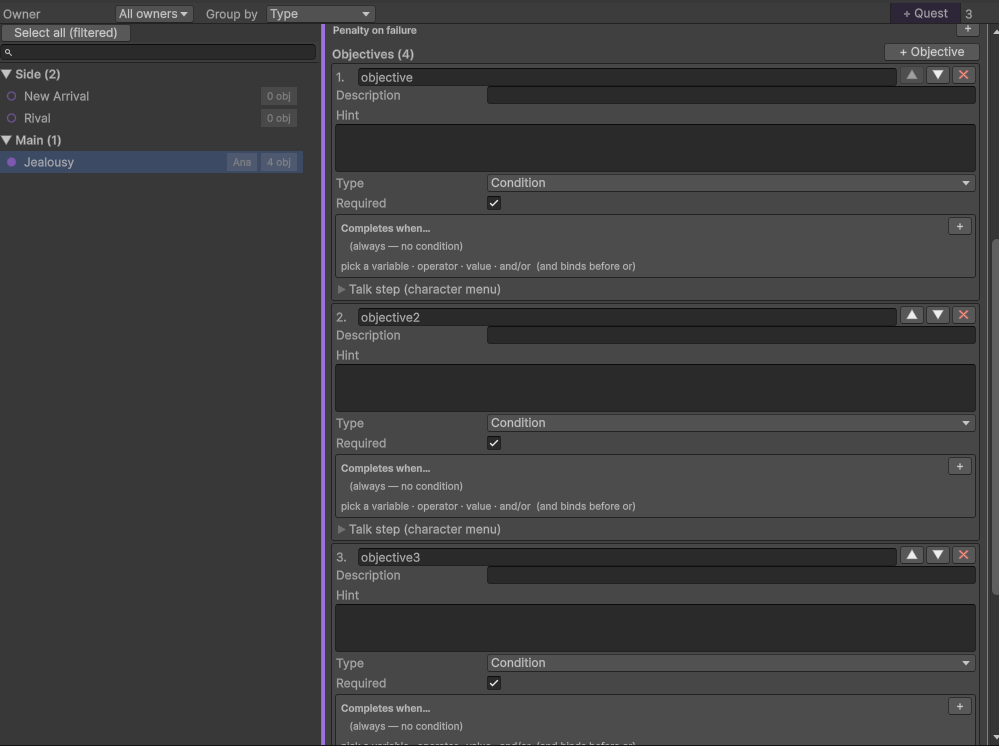
| Field | What it is |
|---|---|
| Id | Stable within the quest. |
| Description | The one-line “what to do”, shown in the quest log and used as the talk-menu label. |
| Hint | The walkthrough text the quest log shows. See Hints. |
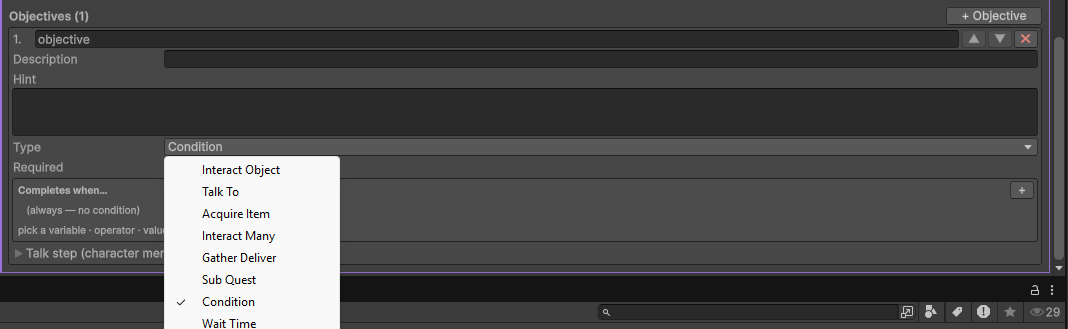
| Type | One of the eight below. |
| Required | Off = optional. Optional objectives do not block completion. |
The eight objective types
Every type is a template that writes a completion condition underneath. The condition is still the truth; the type gives you the right pickers instead of raw keys. All of them resolve to a completion condition except GatherDeliver, which is completed by handing the items over.
| Type | Use it when | What it asks for |
|---|---|---|
| InteractObject | The player must click one specific thing. | A flag variable that the object’s scene sets. Done when the flag is true. |
| TalkTo | The player must go and speak to someone. | Nothing but its talk step below. Completes when that conversation ends (Complete on talk is on by default for this type). |
| AcquireItem | The player must be holding something. | An item and a count. Done when the inventory holds that many. |
| InteractMany | The player must do the same thing N times. | A counter variable and a number. Done when the counter reaches it. The scene that does the thing increments the counter with a Set variable block. |
| GatherDeliver | The player must fetch things and hand them over. | The items and counts. Not a condition — see below. |
| SubQuest | This step is another whole quest. | A quest. Done when that quest is completed. |
| Condition | Nothing above fits. | The raw condition, whatever you like. The escape hatch. |
| WaitTime | The player has to let time pass. | Wait days and/or Wait dayparts, counted from the moment the objective unlocked. Both must elapse. |
Note WaitTime with both values at 0 completes immediately. The editor warns you.
If you hand-write a condition that does not match the type’s template, the editor shows it as-is with a Rewrite from the type’s pickers button rather than overwriting your work.
GatherDeliver: the one that is not a condition
A GatherDeliver objective is not completed by a condition — it is completed by handing the items over. Holding the items is not enough; the player has to give them to someone.
- Items to deliver — a list of item and count.
- Any-of total — if greater than 0, require that many items in total from the listed ids, and ignore the individual counts. “Bring me five herbs, any five.”
- Delivery timing — when the hand-over settles:
| Timing | What happens |
|---|---|
OnPick | The items are consumed the instant the menu entry is picked, so the dialogue that follows already sees the objective done. |
OnBranchEnd | The dialogue plays first; the hand-over settles when the branch ends. |
DialogueBlock | No automatism. You put a Deliver items block inside the dialogue, exactly where the character takes the basket. |
The hand-over itself happens either from the character’s talk menu — an entry appears there automatically, but only once the player is actually holding the items — or from a Deliver items block inside a scene.
Warning The Deliver items block does nothing, silently, if the player does not have the items. It is not an error and it does not stop the scene. Gate the branch that contains it with a condition on the inventory, or let the talk menu do the gating for you.
The hint
The Hint is the walkthrough text: “The miller works the morning shift, and he does not open on Sunday.” The in-game quest log shows it, and in an ordered quest only the current objective’s hint is revealed — so a quest log is a hint system, not a spoiler. See Character screens.
The talk step
An objective can be a thing you say to somebody. Open Talk step (character menu) on the objective:
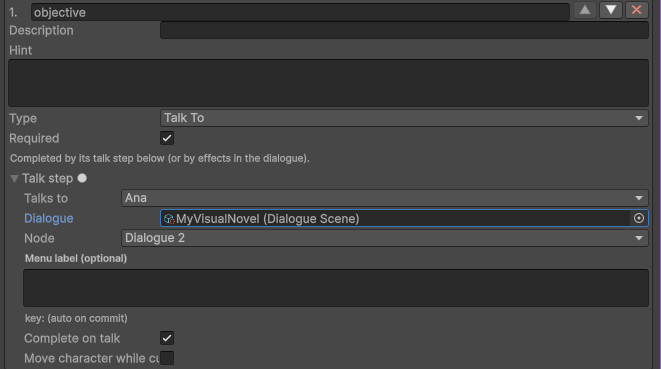
| Field | What it is |
|---|---|
| Talks to | Who. Empty = the quest’s owner. |
| Dialogue | The scene presented from that character’s talk menu while this step is current. |
| Node | Which node of it. |
| Menu label (optional) | The label in the menu. Empty = the objective’s description, or the quest’s title. |
| Complete on talk | Mark this objective done when the branch ends. |
A quest’s talk steps are inserted into that character’s talk menu automatically — you never maintain a menu. See Talk menu, which owns that idea in full.
The map marker
When a step moves a character (below), you can choose what she looks like in the room she has been moved to:

- Marker sprite — the art. Setting one here makes it win over everything else.
- Conditional marker sprites — an ordered list; the first case whose condition passes wins, otherwise the default sprite. A different pose per daypart, or per variable.
- Position, Scale, Sorting order — where in the room, how big, how far forward. Sorting order 0 means “just above the room background”.
Leave the sprite empty and the marker falls back to the routine’s own visual, then to a character spot in the room with the character’s free-roam sprite.
The routine override
While the quest is active and this step is the current one, the step can move its talk character to another room, overriding her routine entirely.

| Field | What it is |
|---|---|
| Move character while current | Turn the override on. |
| Room | Where she goes. |
| Days | Weekday tick list. Empty = every day. |
| Dayparts | Daypart tick list. Empty = all dayparts. |
The character’s location variable follows the override, so every condition in the game agrees with what the
player can see. If several steps could move the same character, the first matching step wins (catalog
order). When the step is done, or the quest ends, she goes back to her routine.
This is how “meet me at the docks at midnight” works without a single line of scripting. See Character routines.
Completion
A quest completes when enough required objectives are done:
- Completion threshold 0 (the default) means all required objectives.
- A threshold of N means at least N of them — “clean any 3 of the 4 rooms”.
- If no objective is marked required, the threshold is measured against all the objectives instead: every one of them at threshold 0, or at least N. A quest with only optional objectives is not free money.
When it completes, the reward fires once. When Fails when passes while it is active, the quest fails and the penalty fires once.
Recurring quests
Once is a normal one-shot quest. The other three repeat.
| Recurrence | The period |
|---|---|
Daily | One period per game day. |
Weekly | One period per game week. A week is as long as your weekday list (7 if you have none). |
SpecificDays | Like Daily, but the quest only runs on the weekdays you tick. |
The period is derived from the game day, so it needs game time and it moves only when you advance time.
What happens at a rollover. When a new period begins, the period that just ended is settled first:
- if the quest was
completed, its result is recorded ascompleted; - if it was active and not completed, the penalty is paid and its result is recorded as
failed; - a quest that never started has nothing to settle — it simply keeps waiting for its Starts when.
Then the quest is reset for the new period: every objective is cleared, the stage goes back to 0, and the
reward and penalty latches are released so they can fire again. A Daily/Weekly quest re-activates
immediately; a SpecificDays quest re-arms only on one of its scheduled weekdays and lies dormant otherwise.
The result of the last settled period is readable as @quest:<id>:@lastResult (completed or failed), which
is what you check when the consequence lands the next morning: “You did not deliver yesterday. My cousin will
hear about this.”
Warning A
SpecificDaysquest with no days ticked never runs. The editor warns you. It also needs weekdays in your Time Config to have anything to tick.
Worked example: five apples for Ana, every day
Goal. Every day, the player must bring Ana five apples. She rewards 20 coins. If the day ends without the delivery, she loses a little affection.
Before you start, make sure you have: a Time Config on the BeastyManager with dayparts and weekdays
(game time), an item apple (items and inventory), a character
ana with a routine so she is somewhere the player can find her
(character routines), and a variable gold.
1. Create the quest. Characters tab, Quests sub-tab, + Quest.
| Field | Value |
|---|---|
| Id | ana_apples |
| Title | Apples for Ana |
| Description | Ana needs five apples every day for the pies. |
| Owner | ana |
| Category | Side |
| Order mode | Ordered |
| Recurrence | Daily |
| Completion threshold | 0 (all required objectives) |
| Starts when | (empty — available from the start) |
| Fails when | (empty — the daily rollover handles failure) |
| Reward on completion | gold Add 20 |
| Penalty on failure | ana.affection Subtract 1 |
2. Add the objective. + Objective.
| Field | Value |
|---|---|
| Id | deliver_apples |
| Description | Bring Ana five apples |
| Hint | Ana is at the bakery in the morning. Apples grow in the orchard. |
| Type | GatherDeliver |
| Required | on |
| Items to deliver | apple x 5 |
| Any-of total | 0 |
| Delivery timing | OnPick |
3. Give it a conversation. Open Talk step (character menu) on the objective:
| Field | Value |
|---|---|
| Talks to | (empty — Ana, the quest’s owner) |
| Dialogue | Ana_Delivery (a small scene: she takes the basket and thanks the player) |
| Node | its entry node |
| Menu label | (empty — the objective’s description is used) |
4. That is the whole quest. Now play it.
- The player picks apples in the orchard until the inventory holds five.
- They walk into the bakery and click Ana. Her talk menu opens — and because the player is now holding five apples, a new entry has appeared at the top: “Bring Ana five apples”. It was not there this morning, and you did not add it.
- They pick it. Because the delivery timing is
OnPick, the apples are gone from the inventory before the first line plays, soAna_Deliverycan already say “these are perfect”. - The branch ends. The objective is done, so the quest is
completed:goldgoes up by 20, once. - The player sleeps. The Advance time block in the sleep scene rolls the day over. The quest resets: the objective is cleared, the reward latch is released, and it is active again. The talk-menu entry is gone until the player is carrying five apples once more.
- If the player sleeps without delivering, the rollover settles the old period as
failed:ana.affectiondrops by one, and@quest:ana_apples:@lastResultisfailed— which you can read in Ana’s next conversation to have her mention it.
Variations worth knowing.
- Make it Weekly and it becomes a standing order settled every week instead.
- Make it SpecificDays and tick Tuesday and Friday, and Ana only wants apples on market days.
- Set Any-of total to 5 and list
apple,pear,plum, and any five of them will do. - Set Delivery timing to
DialogueBlockand put a Deliver items block halfway throughAna_Delivery, and the basket changes hands at the exact line where she reaches for it.
See also
- Talk menu — where a quest’s talk steps show up, automatically.
- Items and inventory — items, counts, the Deliver items block.
- Character routines — quest routine overrides.
- Character screens — the in-game quest log and its hints.
- Game time — the day counter that drives recurrence.
- Gameplay APIs —
BeastyQuestsfor programmers.