

beasty-visual-novel / reference / prefabs.md
Prefabs
Every prefab the package ships, and exactly which components it mounts. Use this page to find the prefab to open when you want to restyle a screen.
Everything the player sees is a uGUI prefab. Nothing is drawn from code, so you can restyle any screen without touching C#. How to restyle safely, and how to keep your changes when the package updates, is in UI prefabs.
The prefabs live in BeastyVN/Prefabs/, except VNMenuRoot and VNBacklogEntry, which live in
BeastyVN/Runtime/UI/Prefabs/.
Lookup table
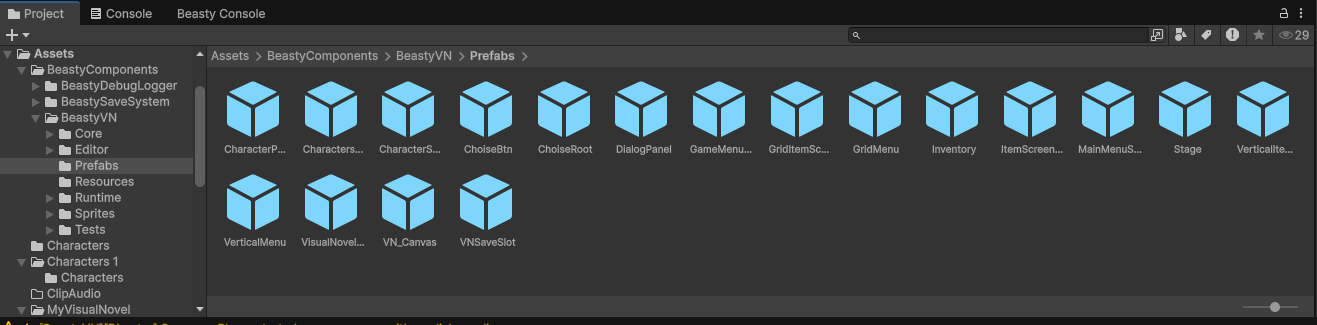
| Prefab | Mounts | What it is |
|---|---|---|
VisualNovelScene | BeastyManager, VNGameController, VisualNovelController, StageController, FreeRoamController, FreeRoamScreenController, VNAudioManager, VNInputModuleInstaller, BeastyAspectRatioEnforcer, BeastyLoadingScreen, VNMenuManager, DialogueView, ChoiceView, FreeRoamScenario | A whole ready-made scene: drop it in and press Play. |
VN_Canvas | DialogueView, ChoiceView, ContinueIndicatorBlink, DialogueTextEffect, VNMenuManager, MainMenuScreen, GameMenuScreen, SaveLoadScreen, PreferencesScreen, HistoryScreen, CreditsScreen, HelpScreen, VNConfirmDialog, BeastyLoadingScreen, VNLocalizedText | The entire UI in one prefab. |
Stage | FreeRoamScenario | The stage root and the free-roam scenario. |
DialogPanel | DialogueTextEffect | The dialogue box: name plate, text, continue indicator. |
ChoiseRoot | (uGUI only) | The container the choice buttons are spawned into. |
ChoiseBtn | (uGUI only) | One choice button, instantiated per option. |
VNMenuRoot | VNMenuManager, MainMenuScreen, GameMenuScreen, SaveLoadScreen, PreferencesScreen, HistoryScreen, CreditsScreen, HelpScreen, VNConfirmDialog, VNLocalizedText | Every menu screen under one root. |
MainMenuScreen | MainMenuScreen | The title screen. |
GameMenuScreen | GameMenuScreen, SaveLoadScreen, PreferencesScreen, HistoryScreen, CreditsScreen, HelpScreen | The in-game menu and the screens it opens. |
VNSaveSlot | SaveSlotView | One save slot. Instantiated per slot. |
VNBacklogEntry | (uGUI only) | One line in the history screen. Instantiated per line. |
Inventory | InventoryScreen, InventorySlot, InventoryDetailPopup, FlexibleGridLayout | The inventory screen, its slots and the detail popup. |
CharactersMenu | CharacterListScreen, CharacterListRow | The cast list. |
CharacterProfile | CharacterProfileScreen, CharacterStatsScreen, CharacterStatRow, CharacterRoutineScreen, CharacterQuestsScreen, CharacterQuestRow, FreeRoamScreenElement | One character’s profile, with its tab bar and section panels. |
CharacterStats | CharacterStatsScreen, CharacterStatRow | The stats panel on its own. |
GridMenu | FlexibleGridLayout | An overlay screen laid out as a grid. |
VerticalMenu | FreeRoamScreenElement | An overlay screen laid out as a vertical list. |
GridItemScreenElement, ItemScreenElement, VerticalItemScreenElement | FreeRoamScreenElement, VariableBoundLabel | The element templates a screen’s items are built from. |
BeastyVNMixer | (AudioMixer) | The mixer, with one group per channel: Music, Ambient, Sfx, Voice. |
The scene prefabs
VisualNovelScene is a complete scene. It mounts the BeastyManager with every manager it owns, the Stage
and the Canvas. Tools > Beasty VN > Setup > Create Scene builds the same rig into your own scene instead,
which is what you want in a real project.
Stage carries the FreeRoamScenario component. That is where you assign your FreeRoamMapGraph.
The dialogue and choice prefabs
VN_Canvas holds the whole interface. DialogueView drives the dialogue box, ChoiceView drives the
options.
- To restyle the dialogue box, edit
DialogPanel. - To restyle the choices, edit
ChoiseBtn(one button) andChoiseRoot(their container).ChoiceViewinstantiatesChoiseBtnonce per option that passes its condition.
ChoiseRoot and ChoiseBtn mount no Beasty components at all. They are ordinary uGUI objects, which means
you can rebuild them however you like as long as the parts the view looks for are still there.
See Dialogue and stage and Choices and decisions.
The menu prefabs
VNMenuRoot mounts VNMenuManager plus every screen it manages: main menu, game menu, save/load,
preferences, history, credits, help, and the confirm dialog. It self-wires to the BeastyManager rig at
runtime, so you can drop it under any Canvas.
MainMenuScreen and GameMenuScreen also exist as standalone prefabs, which is what you edit when you want
to restyle one menu rather than the whole set.
VNSaveSlot and VNBacklogEntry are templates: one is instantiated per save slot, one per line of history.
Restyle the template and every row follows.
Tools > Beasty VN > Setup > Build Default Menu Prefabs rebuilds these from scratch and warns you before it
overwrites anything. Tools > Beasty VN > Setup > Upgrade UI Prefabs (keep customizations) updates them
while keeping your restyling.
The VNLocalizedText components on these prefabs make the menus follow the player’s language. After
rebuilding or restyling, run Bake Localized UI Labels so any label that lost its component gets it back -
see Localization.
The gameplay screens
The inventory and the character screens are built by copying the shipped prefab into your project’s folder and registering the copy as a screen on the VNContext.
Note You restyle your copy, not the prefab in the package folder. Editing the shipped prefab has no effect on a screen that was already created, because the screen points at the copy.
| You want to restyle | Open |
|---|---|
| The inventory grid, a slot, the item detail popup | Inventory |
| The cast list | CharactersMenu |
| A character’s profile, its tab bar, its sections | CharacterProfile |
| The stats panel alone | CharacterStats |
| An overlay screen laid out as a grid | GridMenu plus GridItemScreenElement |
| An overlay screen laid out as a list | VerticalMenu plus VerticalItemScreenElement |
VariableBoundLabel on the element templates is what lets a HUD label show a live variable.
See Items and inventory, Character screens and Screens and HUD.
The mixer
BeastyVNMixer is a standard Unity AudioMixer with one group per channel: Music, Ambient, Sfx and Voice.
The Preferences screen’s volume sliders write to it. Point the audio manager at your own mixer if you
prefer, as long as it exposes the same four groups.
See Audio and music.
See also
- UI prefabs - restyling and upgrading, in detail
- Menu items
- Assets