

beasty-visual-novel / world / character-routines.md
Character routines
Characters who are where they should be, when they should be. A routine says: given the day, the daypart and the state of the world, which room is this character in — or is she nowhere at all. This page is for writers and designers.
Routines need game time. With no Time Config assigned to the BeastyManager, every time condition is false and every routine collapses to its fallback.
Where a routine lives
One routine per character, stored on the FreeRoam Map Graph — the same asset that holds your rooms. You
edit routines in the FreeRoam tab of the Beasty VN window (Tools > Beasty VN > Editor), either from
inside a room (its timeline) or from the Routines grid.
A routine is made of three things, from the outside in:
- Profiles — named schedules. One is active at a time.
- Rules — inside a profile, an ordered list of “if this condition holds, be in that room”.
- The visual — how the character is drawn in the room once placed.
Profiles: swapping a whole schedule in one block
A character has one or more named profiles (Default, Working, Fired, Sick) plus a default profile
name. The active profile is the one whose name matches the character’s routine-mode variable
(@char:<id>:@routineMode, shown in the condition picker as maya.routineMode). If that variable is empty,
or names a profile that does not exist, the default profile is used; failing that, the first one.
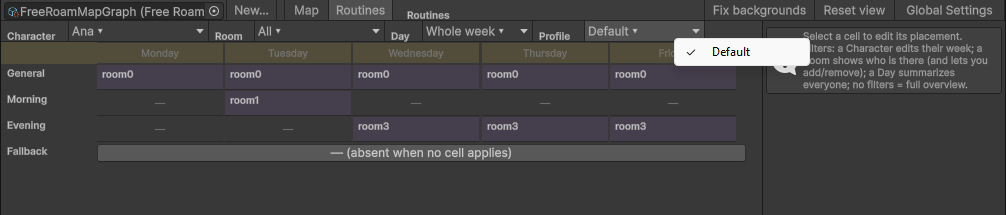
This is the point of profiles: when the story turns, you switch a character’s entire week with a single block. She gets fired, he falls ill, they move to the coast — one block, not thirty rule edits.
Two ways to write it:
- the Routine override block (palette category World): pick the character, pick the profile name. Leave the profile empty to go back to the default.
- a Set variable block on
maya.routineMode, which does exactly the same thing. The block is the typed, picker-driven version.
In the .vnbeasty script the same thing is one line:
routine maya Fired
routine maya            # back to the default profile
Because the routine mode is an ordinary variable, it saves, loads and rewinds with everything else.
A profile you no longer need can be deleted from the profile selector (Delete profile…, with
confirmation); the built-in Default profile stays. A character routine left completely empty — no
placements, no fallback, no interaction dialogues — is pruned from the map graph automatically, in the same
undo step as the deletion that emptied it.
Rules: first match wins
A profile holds an ordered list of rules and one fallback. Each rule is a condition plus a room.
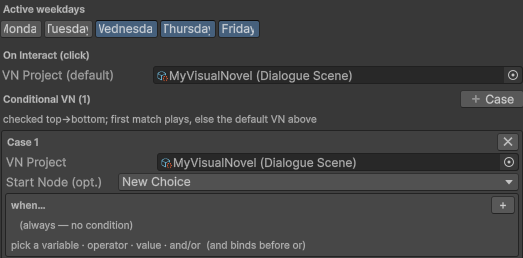
The resolver walks the rules from the top and stops at the first rule whose condition passes. If no rule matches, the fallback is used.
Important A rule with an empty room means the character is absent — not in that room, not in any room, not on the map at all. That is how you author “she is not around at night”: leave the fallback’s room empty.
An empty condition always passes, so a rule with no condition placed above others makes everything below it dead. Order matters.
The routine grid editor
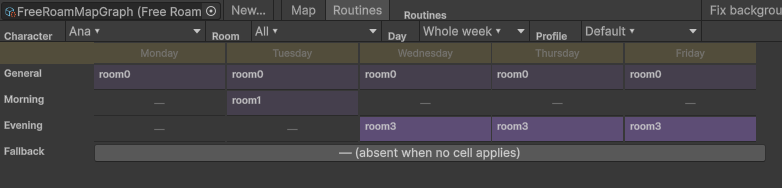
The FreeRoam tab has a Map / Routines toggle in its toolbar. Switch to Routines and you get one canvas: columns are weekdays, rows are dayparts, plus a General row on top and a Fallback row at the bottom.
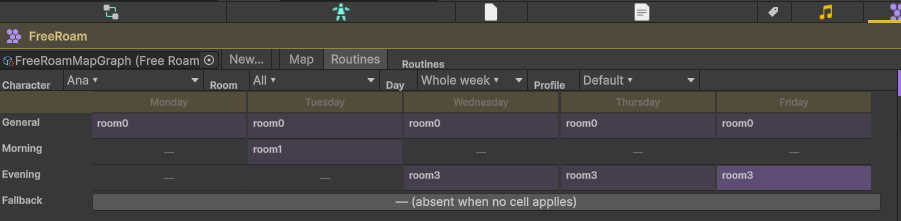
A filter bar drives what the grid shows and what it edits:
| Filter | Effect |
|---|---|
| Character | Pick one and the grid edits that character’s week. This is the editing mode. |
| Room | Highlights the cells that resolve to that room, so you can see who is in the bakery all week. |
| Day | Narrows the grid to one weekday. |
| Profile | Which of the character’s profiles you are editing. |
Click an empty cell and pick a room from the menu; click a filled cell to select it and edit its placement in the inspector on the right (its room, its art, its position). Drag across cells to paint the same room over a run of them. Clear (absent) empties a cell.
The General row is for placements that do not depend on the weekday. A rule authored there applies to every day, which keeps the rule list small: a baker who is at the bakery every morning is one rule, not seven.
Note The grid is a lens over the rule list, not a second model. It reads the rules, shows them as cells, and writes them back as rules. A hand-written rule with a condition the grid cannot draw (say, one that also checks a quest state) is preserved untouched and flagged as advanced — the grid will not silently destroy it. The rules stay the truth.
The grid also surfaces conflicts: a character placed in two rooms at the same daypart on overlapping days. Dropping a character into a room automatically removes their placement in other rooms at that daypart, so you rarely create one by hand — but rules written by hand can, and the grid tells you.
Rooms are not the only way to be somewhere
There is a second, room-first way to author the same data: drill into a room in the Map view and use its
timeline, which has a lane per daypart and a + Character button per lane. Adding a character to the Morning
lane of the Bakery writes exactly the rule the grid would have written. The two editors are two views of one
rule list; use whichever matches how you are thinking — “what does Maya do this week” or “who is in the bakery
in the morning”.
What the character looks like in the room
Once a rule places a character in a room, the runtime has to draw her. It uses the first of these that exists:
- The quest step’s marker sprite, when a quest routine override moved her there and that step defines a marker.
- The rule’s own visual — the sprite, position, scale, sorting order and hover feedback authored on the placement itself (the grid’s inspector, or the room timeline).
- A free character spot in the room prefab, using the character’s free-roam sprite.
- The room’s centre, if there are no spots left.
The character’s own art comes from the free-roam sprite on the Character Definition; if that is empty, her base expression sprite is used.
Character spots
A spot is a child object inside a room prefab carrying a FreeRoamCharacterSpot component. It marks where
someone stands. Its position and scale are decisions of the prefab, not data in the routine — you place it
in the scene, by eye, with Unity’s own tools.
Each character placed generically takes the next free spot in the room. Two characters therefore never share a spot: the first takes the first spot, the second takes the second. If the room runs out of spots, the next character falls back to the room’s centre — so give a room as many spots as it can ever hold at once. See Free-roam rooms for how to add one.
Poses beat markers
If you author a character pose in a room — a room object whose owner is that character — the pose wins and the generic marker is suppressed, so the character is never drawn twice. Poses are the way to give a character a specific look in a specific room. See Interactables and doors.
When routines recompute
On every room enter, and whenever the shared variable store changes — which includes every Advance time block, every Set variable block, every quest that completes. You never trigger a recompute yourself.
Each recompute publishes three reserved variables per character:
| Store key | Picker label | Value |
|---|---|---|
@char:<id>:@routineLocation | maya.location | The room id she is in, or empty when absent. |
@char:<id>:@routineSpot | maya.spot | The spot id inside that room, or empty. |
@char:<id>:@routineMode | maya.routineMode | The active profile name. Writing this swaps her schedule. |
Which means you can write conditions about where people are, anywhere conditions are accepted:
maya.location == Bakery
maya.spot == Counter
maya.routineMode == Working
A room background that changes when someone is in the room, a choice that only appears when the shopkeeper is present, a quest that starts when the player finds her at the park — all of it is one condition.
Clicking a character in a room
Clicking a character in a room runs, in this order:
- the routine’s on interact list — the first case whose condition passes plays its scene;
- otherwise the character’s talk menu, if it resolves to any entries;
- otherwise the routine’s default on-interact scene.
So the moment you give a character a talk menu, clicking them opens it. You do not wire anything.
Quest routine overrides
A quest can move a character. While a quest is active and one of its talk steps is the current one, that step
can place its character in another room — optionally only on certain weekdays and during certain dayparts. It
beats the routine entirely for as long as it applies, and the character’s location variable follows, so every
condition agrees with what the player sees.
The first matching step wins. Author it on the objective, under Talk step > Move character while current. See Quests.
The in-game routine calendar
Players can see a character’s schedule. The Character Routine screen shows the selected character’s calendar in day view (one row per daypart of today) or week view (one row per weekday and daypart). It is populated only when the character’s Show routine flag is on, so a mysterious stranger stays mysterious. See Character screens.

Worked example: a baker
Goal. Maya bakes in the morning, walks in the park in the evening, and is not around at night.
- Time. Create a Time Config (
Create > Beasty VN > Config > Time Config), modeSlotsOnly, daypartsMorning,Afternoon,Evening,Night. Drag it into the BeastyManager’s Time Config field. - Rooms. In the FreeRoam tab, create the rooms
BakeryandPark(each gets its prefab; see Free-roam rooms). - Spots. Open the Bakery prefab, add a child object named
Counterwhere Maya should stand, and put aFreeRoamCharacterSpotcomponent on it. Do the same for aBenchin the Park prefab. - Routine. Switch the FreeRoam tab to Routines and filter by character Maya. In the grid:
- General row is not what you want here (the placement depends on the daypart), so use the daypart rows.
- Morning row, every weekday: pick Bakery.
- Evening row, every weekday: pick Park.
- Afternoon and Night: leave empty.
- Fallback: leave the room empty, so anything not covered means absent.
- Sprite. On Maya’s Character Definition, set the free-roam sprite.
- Time has to move. Give the player something that advances it: a bed with advance time on click, or an Advance time block in a scene they pass through.
- Press Play. In the morning the Bakery has Maya at the counter; in the evening she is on the bench in the park; at night nobody is home.
Now the story turn. She is fired in chapter 3:
- In the Routines grid, use the Profile filter to create a second profile named
Fired, and fill it in: Morning at thePark, everything else empty. - Back in the story, at the moment she is fired, drop one Routine override block: character
maya, profileFired.
From that line on, Maya’s whole week is different, in every room, in every condition, in her calendar screen — and it rewinds correctly if the player rolls back past it.
See also
- Game time — dayparts, the clock, and how time moves.
- Free-roam rooms — rooms, room prefabs, character spots.
- Interactables and doors — character poses.
- Quests — quest routine overrides.
- Character screens — the in-game routine calendar.
- Gameplay APIs —
BeastyRoutinesfor programmers.